
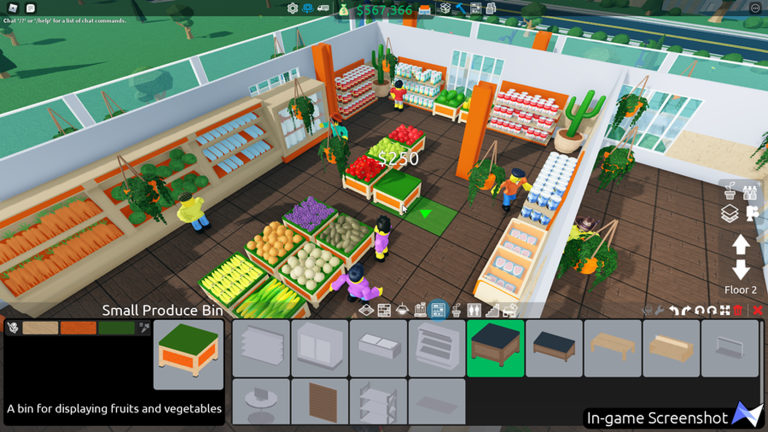
Running a store in Retail Tycoon 2 can eat up all your free time if you are trying to keep up after a new update. Using a Retail Tycoon 2 script is a simple way to handle the repetitive tasks while you focus on building your ideal shop.
The game is all about setting up your shop, stocking shelves, and keeping customers happy as you make cash. With recent updates bringing in fun decorations like balloons and wooden fences, plus new paper goods to sell, managing your store layout and traffic flow with one-way gates takes a bit of planning.
If you want to test out some Lua tools while running your establishment, the working code below is ready to copy and paste into your executor.
Retail Tycoon 2 Script – Better Manager
local RS = game:GetService("ReplicatedStorage")
local RSvc = game:GetService("RunService")
local TS = game:GetService("TweenService")
local UIS = game:GetService("UserInputService")
local RefrInt = 2
local TrackCfg = {}
local GUIVisible = true
local GetStorage = RS:WaitForChild("Remotes", 5):WaitForChild("GetStorage", 5)
local BuyStorage = RS:WaitForChild("Remotes", 5):WaitForChild("BuyStorage", 5)
if not GetStorage or not BuyStorage then
	warn("Remote function failure.")
	return
end
local Gui = Instance.new("ScreenGui")
Gui.Name = "BtrMgr"
Gui.IgnoreGuiInset = true
Gui.ResetOnSpawn = false
Gui.Parent = gethui()
local MainFrm = Instance.new("Frame")
MainFrm.Name = "MainFrame"
MainFrm.Size = UDim2.new(0, 600, 0, 500)
MainFrm.Position = UDim2.new(0.5, -300, 0.5, -250)
MainFrm.BackgroundColor3 = Color3.fromRGB(26, 28, 36)
MainFrm.BorderSizePixel = 0
MainFrm.ClipsDescendants = true
MainFrm.Parent = Gui
local MainCnr = Instance.new("UICorner")
MainCnr.CornerRadius = UDim.new(0, 16)
MainCnr.Parent = MainFrm
local Header = Instance.new("Frame")
Header.Name = "Header"
Header.Size = UDim2.new(1, 0, 0, 60)
Header.BackgroundTransparency = 1
Header.ZIndex = 2
Header.Parent = MainFrm
local TitleCont = Instance.new("Frame")
TitleCont.Name = "TitleContainer"
TitleCont.Size = UDim2.new(1, -120, 1, 0)
TitleCont.BackgroundTransparency = 1
TitleCont.ZIndex = 2
TitleCont.Parent = Header
local TitleLbl = Instance.new("TextLabel")
TitleLbl.Name = "Title"
TitleLbl.Size = UDim2.new(1, -70, 1, 0)
TitleLbl.Position = UDim2.new(0, 20, 0, 0)
TitleLbl.BackgroundTransparency = 1
TitleLbl.Text = "Better Manager"
TitleLbl.Font = Enum.Font.GothamBold
TitleLbl.TextSize = 20
TitleLbl.TextColor3 = Color3.fromRGB(255, 255, 255)
TitleLbl.TextXAlignment = Enum.TextXAlignment.Left
TitleLbl.TextYAlignment = Enum.TextYAlignment.Center
TitleLbl.ZIndex = 2
TitleLbl.Parent = TitleCont
local CredLbl = Instance.new("TextLabel")
CredLbl.Name = "Credits"
CredLbl.Size = UDim2.new(0, 150, 1, 0)
CredLbl.Position = UDim2.new(0, 180, 0, 0)
CredLbl.BackgroundTransparency = 1
CredLbl.Text = "v1.0 by Lilah"
CredLbl.Font = Enum.Font.Gotham
CredLbl.TextSize = 12
CredLbl.TextColor3 = Color3.fromRGB(150, 155, 170)
CredLbl.TextXAlignment = Enum.TextXAlignment.Left
CredLbl.TextYAlignment = Enum.TextYAlignment.Center
CredLbl.ZIndex = 2
CredLbl.Parent = TitleCont
local ControlsCont = Instance.new("Frame")
ControlsCont.Name = "Controls"
ControlsCont.Size = UDim2.new(0, 110, 0, 40)
ControlsCont.Position = UDim2.new(1, -120, 0.5, -20)
ControlsCont.BackgroundTransparency = 1
ControlsCont.ZIndex = 2
ControlsCont.Parent = Header
local ControlsLyt = Instance.new("UIListLayout")
ControlsLyt.FillDirection = Enum.FillDirection.Horizontal
ControlsLyt.HorizontalAlignment = Enum.HorizontalAlignment.Right
ControlsLyt.VerticalAlignment = Enum.VerticalAlignment.Center
ControlsLyt.Padding = UDim.new(0, 10)
ControlsLyt.Parent = ControlsCont
local MinBtn = Instance.new("TextButton")
MinBtn.Name = "MinimizeBtn"
MinBtn.Size = UDim2.new(0, 40, 0, 40)
MinBtn.BackgroundColor3 = Color3.fromRGB(40, 43, 54)
MinBtn.BorderSizePixel = 0
MinBtn.Text = "—"
MinBtn.Font = Enum.Font.GothamBold
MinBtn.TextSize = 18
MinBtn.TextColor3 = Color3.fromRGB(255, 255, 255)
MinBtn.ZIndex = 2
MinBtn.Parent = ControlsCont
local MinCnr = Instance.new("UICorner")
MinCnr.CornerRadius = UDim.new(0, 8)
MinCnr.Parent = MinBtn
local CloseBtn = Instance.new("TextButton")
CloseBtn.Name = "CloseBtn"
CloseBtn.Size = UDim2.new(0, 40, 0, 40)
CloseBtn.BackgroundColor3 = Color3.fromRGB(237, 66, 69)
CloseBtn.BorderSizePixel = 0
CloseBtn.Text = "X"
CloseBtn.TextSize = 20
CloseBtn.Font = Enum.Font.GothamBold
MinBtn.TextSize = 18
CloseBtn.TextColor3 = Color3.fromRGB(255, 255, 255)
CloseBtn.ZIndex = 2
CloseBtn.Parent = ControlsCont
local CloseCnr = Instance.new("UICorner")
CloseCnr.CornerRadius = UDim.new(0, 8)
CloseCnr.Parent = CloseBtn
local StatusB = Instance.new("Frame")
StatusB.Name = "StatusBar"
StatusB.Size = UDim2.new(1, -40, 0, 40)
StatusB.Position = UDim2.new(0, 20, 0, 70)
StatusB.BackgroundColor3 = Color3.fromRGB(35, 38, 48)
StatusB.BorderSizePixel = 0
StatusB.ZIndex = 2
StatusB.Parent = MainFrm
local StatusCnr = Instance.new("UICorner")
StatusCnr.CornerRadius = UDim.new(0, 8)
StatusCnr.Parent = StatusB
local StatusLbl = Instance.new("TextLabel")
StatusLbl.Name = "StatusText"
StatusLbl.Size = UDim2.new(0.65, -10, 1, 0)
StatusLbl.Position = UDim2.new(0, 10, 0, 0)
StatusLbl.BackgroundTransparency = 1
StatusLbl.Text = " Initializing..."
StatusLbl.Font = Enum.Font.Gotham
StatusLbl.TextSize = 14
StatusLbl.TextColor3 = Color3.fromRGB(180, 185, 200)
StatusLbl.TextXAlignment = Enum.TextXAlignment.Left
StatusLbl.ZIndex = 2
StatusLbl.Parent = StatusB
local SearchBx = Instance.new("TextBox")
SearchBx.Name = "SearchBox"
SearchBx.Size = UDim2.new(0.35, -10, 0, 30)
SearchBx.Position = UDim2.new(0.65, 5, 0.5, -15)
SearchBx.BackgroundColor3 = Color3.fromRGB(45, 48, 60)
SearchBx.BorderSizePixel = 0
SearchBx.Text = ""
SearchBx.PlaceholderText = " Search Stock..."
SearchBx.Font = Enum.Font.Gotham
SearchBx.TextSize = 14
SearchBx.TextColor3 = Color3.fromRGB(255, 255, 255)
SearchBx.TextXAlignment = Enum.TextXAlignment.Left
SearchBx.TextScaled = true
SearchBx.ClearTextOnFocus = false
SearchBx.ZIndex = 2
SearchBx.Parent = StatusB
local SearchCnr = Instance.new("UICorner")
SearchCnr.CornerRadius = UDim.new(0, 6)
SearchCnr.Parent = SearchBx
local ScrollFrm = Instance.new("ScrollingFrame")
ScrollFrm.Name = "StockList"
ScrollFrm.Size = UDim2.new(1, -40, 1, -130)
ScrollFrm.Position = UDim2.new(0, 20, 0, 120)
ScrollFrm.BackgroundTransparency = 1
ScrollFrm.BorderSizePixel = 0
ScrollFrm.ScrollBarThickness = 4
ScrollFrm.ScrollBarImageColor3 = Color3.fromRGB(88, 101, 242)
ScrollFrm.CanvasSize = UDim2.new(0, 0, 0, 0)
ScrollFrm.ZIndex = 2
ScrollFrm.Parent = MainFrm
local ListLyt = Instance.new("UIListLayout")
ListLyt.Padding = UDim.new(0, 8)
ListLyt.SortOrder = Enum.SortOrder.Name
ListLyt.HorizontalAlignment = Enum.HorizontalAlignment.Center
ListLyt.Parent = ScrollFrm
ListLyt:GetPropertyChangedSignal("AbsoluteContentSize"):Connect(function()
	ScrollFrm.CanvasSize = UDim2.new(0, 0, 0, ListLyt.AbsoluteContentSize.Y + 10)
end)
local function CreateEntry(IName)
	local IFrm = Instance.new("Frame")
	IFrm.Name = IName
	IFrm.Size = UDim2.new(0.95, 0, 0, 80)
	IFrm.BackgroundColor3 = Color3.fromRGB(35, 38, 48)
	IFrm.BorderSizePixel = 0
	IFrm.ClipsDescendants = true
	IFrm.ZIndex = 2
	local ICnr = Instance.new("UICorner")
	ICnr.CornerRadius = UDim.new(0, 10)
	ICnr.Parent = IFrm
	local IStrk = Instance.new("UIStroke")
	IStrk.Color = Color3.fromRGB(50, 54, 68)
	IStrk.Thickness = 1
	IStrk.Transparency = 0.5
	IStrk.ApplyStrokeMode = Enum.ApplyStrokeMode.Border
	IStrk.Parent = IFrm
	local CntFrm = Instance.new("Frame")
	CntFrm.Name = "ContentFrame"
	CntFrm.Size = UDim2.new(1, -20, 1, -20)
	CntFrm.Position = UDim2.new(0, 10, 0, 10)
	CntFrm.BackgroundTransparency = 1
	CntFrm.ZIndex = 2
	CntFrm.Parent = IFrm
	local NameLbl = Instance.new("TextLabel")
	NameLbl.Name = "ItemName"
	NameLbl.Size = UDim2.new(0.35, 0, 0, 25)
	NameLbl.Position = UDim2.new(0, 0, 0, 0)
	NameLbl.BackgroundTransparency = 1
	NameLbl.Text = IName
	NameLbl.Font = Enum.Font.GothamBold
	NameLbl.TextSize = 16
	NameLbl.TextColor3 = Color3.fromRGB(255, 255, 255)
	NameLbl.TextXAlignment = Enum.TextXAlignment.Left
	NameLbl.TextTruncate = Enum.TextTruncate.AtEnd
	NameLbl.ZIndex = 2
	NameLbl.Parent = CntFrm
	local StockLbl = Instance.new("TextLabel")
	StockLbl.Name = "StockAmount"
	StockLbl.Size = UDim2.new(0.35, 0, 0, 20)
	StockLbl.Position = UDim2.new(0, 0, 0, 30)
	StockLbl.BackgroundTransparency = 1
	StockLbl.Text = "Stock: 0"
	StockLbl.Font = Enum.Font.Gotham
	StockLbl.TextSize = 13
	StockLbl.TextColor3 = Color3.fromRGB(150, 155, 170)
	StockLbl.TextXAlignment = Enum.TextXAlignment.Left
	StockLbl.ZIndex = 2
	StockLbl.Parent = CntFrm
	local MinCont = Instance.new("Frame")
	MinCont.Name = "MinContainer"
	MinCont.Size = UDim2.new(0.2, -5, 1, -10)
	MinCont.Position = UDim2.new(0.35, 5, 0, 5)
	MinCont.BackgroundTransparency = 1
	MinCont.ZIndex = 2
	MinCont.Parent = CntFrm
	local MinLbl = Instance.new("TextLabel")
	MinLbl.Size = UDim2.new(1, 0, 0, 18)
	MinLbl.BackgroundTransparency = 1
	MinLbl.Text = "Minimum Stock"
	MinLbl.Font = Enum.Font.Gotham
	MinLbl.TextSize = 11
	MinLbl.TextColor3 = Color3.fromRGB(130, 135, 150)
	MinLbl.TextXAlignment = Enum.TextXAlignment.Left
	MinLbl.ZIndex = 2
	MinLbl.Parent = MinCont
	local MinBx = Instance.new("TextBox")
	MinBx.Name = "MinBox"
	MinBx.Size = UDim2.new(1, 0, 0, 32)
	MinBx.Position = UDim2.new(0, 0, 0, 22)
	MinBx.BackgroundColor3 = Color3.fromRGB(45, 48, 60)
	MinBx.BorderSizePixel = 0
	MinBx.Text = ""
	MinBx.PlaceholderText = "0"
	MinBx.Font = Enum.Font.GothamMedium
	MinBx.TextSize = 14
	MinBx.TextColor3 = Color3.fromRGB(255, 255, 255)
	MinBx.ClearTextOnFocus = false
	MinBx.ZIndex = 2
	MinBx.Parent = MinCont
	local MinBxCnr = Instance.new("UICorner")
	MinBxCnr.CornerRadius = UDim.new(0, 6)
	MinBxCnr.Parent = MinBx
	local RACont = Instance.new("Frame")
	RACont.Name = "RestockContainer"
	RACont.Size = UDim2.new(0.2, -5, 1, -10)
	RACont.Position = UDim2.new(0.55, 5, 0, 5)
	RACont.BackgroundTransparency = 1
	RACont.ZIndex = 2
	RACont.Parent = CntFrm
	local RALbl = Instance.new("TextLabel")
	RALbl.Size = UDim2.new(1, 0, 0, 18)
	RALbl.BackgroundTransparency = 1
	RALbl.Text = "Restock Amount"
	RALbl.Font = Enum.Font.Gotham
	RALbl.TextSize = 11
	RALbl.TextColor3 = Color3.fromRGB(130, 135, 150)
	RALbl.TextXAlignment = Enum.TextXAlignment.Left
	RALbl.ZIndex = 2
	RALbl.Parent = RACont
	local RABx = Instance.new("TextBox")
	RABx.Name = "RestockBox"
	RABx.Size = UDim2.new(1, 0, 0, 32)
	RABx.Position = UDim2.new(0, 0, 0, 22)
	RABx.BackgroundColor3 = Color3.fromRGB(45, 48, 60)
	RABx.BorderSizePixel = 0
	RABx.Text = ""
	RABx.PlaceholderText = "0"
	RABx.Font = Enum.Font.GothamMedium
	RABx.TextSize = 14
	RABx.TextColor3 = Color3.fromRGB(255, 255, 255)
	RABx.ClearTextOnFocus = false
	RABx.ZIndex = 2
	RABx.Parent = RACont
	local RABxCnr = Instance.new("UICorner")
	RABxCnr.CornerRadius = UDim.new(0, 6)
	RABxCnr.Parent = RABx
	local TglBtn = Instance.new("TextButton")
	TglBtn.Name = "ToggleBtn"
	TglBtn.Size = UDim2.new(0.2, -10, 0, 50)
	TglBtn.Position = UDim2.new(0.8, 5, 0.5, -25)
	TglBtn.BackgroundColor3 = Color3.fromRGB(60, 63, 78)
	TglBtn.BorderSizePixel = 0
	TglBtn.Text = "OFF"
	TglBtn.Font = Enum.Font.GothamBold
	TglBtn.TextSize = 14
	TglBtn.TextColor3 = Color3.fromRGB(180, 185, 200)
	TglBtn.ZIndex = 2
	TglBtn.Parent = CntFrm
	local TglCnr = Instance.new("UICorner")
	TglCnr.CornerRadius = UDim.new(0, 8)
	TglCnr.Parent = TglBtn
	local StatusDot = Instance.new("Frame")
	StatusDot.Name = "StatusDot"
	StatusDot.Size = UDim2.new(0, 8, 0, 8)
	StatusDot.Position = UDim2.new(0, 10, 0, 10)
	StatusDot.BackgroundColor3 = Color3.fromRGB(100, 105, 120)
	StatusDot.BorderSizePixel = 0
	StatusDot.ZIndex = 3
	StatusDot.Parent = TglBtn
	local DotCnr = Instance.new("UICorner")
	DotCnr.CornerRadius = UDim.new(1, 0)
	DotCnr.Parent = StatusDot
	return IFrm, NameLbl, StockLbl, MinBx, RABx, TglBtn, IStrk, StatusDot
end
local IsDrg = false
local DrgStrt, StrtPos
Header.InputBegan:Connect(function(Inp)
	if Inp.UserInputType == Enum.UserInputType.MouseButton1 or Inp.UserInputType == Enum.UserInputType.Touch then
		IsDrg = true
		DrgStrt = Inp.Position
		StrtPos = MainFrm.Position
	end
end)
UIS.InputChanged:Connect(function(Inp)
	if
		IsDrg
		and (Inp.UserInputType == Enum.UserInputType.MouseMovement or Inp.UserInputType == Enum.UserInputType.Touch)
	then
		local Delta = Inp.Position - DrgStrt
		MainFrm.Position =
			UDim2.new(StrtPos.X.Scale, StrtPos.X.Offset + Delta.X, StrtPos.Y.Scale, StrtPos.Y.Offset + Delta.Y)
	end
end)
UIS.InputEnded:Connect(function(Inp)
	if Inp.UserInputType == Enum.UserInputType.MouseButton1 or Inp.UserInputType == Enum.UserInputType.Touch then
		IsDrg = false
	end
end)
local function AnimateBtn(Btn, HvColor, PrsColor)
	local OrigColor = Btn.BackgroundColor3
	Btn.MouseEnter:Connect(function()
		TS:Create(Btn, TweenInfo.new(0.2), { BackgroundColor3 = HvColor }):Play()
	end)
	Btn.MouseLeave:Connect(function()
		TS:Create(Btn, TweenInfo.new(0.2), { BackgroundColor3 = OrigColor }):Play()
	end)
	Btn.MouseButton1Down:Connect(function()
		TS:Create(Btn, TweenInfo.new(0.1), { BackgroundColor3 = PrsColor }):Play()
	end)
	Btn.MouseButton1Up:Connect(function()
		TS:Create(Btn, TweenInfo.new(0.1), { BackgroundColor3 = HvColor }):Play()
	end)
end
AnimateBtn(MinBtn, Color3.fromRGB(50, 54, 68), Color3.fromRGB(35, 38, 50))
AnimateBtn(CloseBtn, Color3.fromRGB(255, 80, 82), Color3.fromRGB(220, 50, 52))
local IsMin = false
local FSize = MainFrm.Size
MinBtn.MouseButton1Click:Connect(function()
	IsMin = not IsMin
	local TSize = IsMin and UDim2.new(FSize.X.Scale, FSize.X.Offset, 0, 60) or FSize
	MinBtn.Text = IsMin and "" or "—"
	TS:Create(MainFrm, TweenInfo.new(0.3, Enum.EasingStyle.Quart, Enum.EasingDirection.Out), { Size = TSize }):Play()
end)
CloseBtn.MouseButton1Click:Connect(function()
	local CloseTwn = TS:Create(
		MainFrm,
		TweenInfo.new(0.3, Enum.EasingStyle.Back, Enum.EasingDirection.In),
		{ Size = UDim2.new(0, 0, 0, 0), Position = UDim2.new(0.5, 0, 0.5, 0) }
	)
	CloseTwn:Play()
	CloseTwn.Completed:Connect(function()
		Gui:Destroy()
	end)
end)
local function ToggleGUI()
	GUIVisible = not GUIVisible
	local TSize = GUIVisible and FSize or UDim2.new(0, 0, 0, 0)
	local TPos = GUIVisible and UDim2.new(0.5, -300, 0.5, -250) or UDim2.new(0.5, 0, 0.5, 0)
	local ES = GUIVisible and Enum.EasingStyle.Back or Enum.EasingStyle.Back
	local ED = GUIVisible and Enum.EasingDirection.Out or Enum.EasingDirection.In
	IsMin = false
	MinBtn.Text = "—"
	TS:Create(MainFrm, TweenInfo.new(0.5, ES, ED), { Size = TSize, Position = TPos }):Play()
end
UIS.InputBegan:Connect(function(Inp, GPE)
	if Inp.KeyCode == Enum.KeyCode.RightShift and not GPE then
		ToggleGUI()
	end
end)
local function FilterList(SText)
	local LSText = SText:lower()
	for _, IFrm in ScrollFrm:GetChildren() do
		if IFrm:IsA("Frame") and IFrm.Name ~= "UIListLayout" then
			local IName = IFrm.Name:lower()
			IFrm.Visible = IName:match(LSText) or SText == ""
		end
	end
	ListLyt.AbsoluteContentSize = Vector2.new(0, 0)
end
SearchBx.Changed:Connect(function(Prop)
	if Prop == "Text" then
		FilterList(SearchBx.Text)
	end
end)
SearchBx.FocusLost:Connect(function()
	FilterList(SearchBx.Text)
end)
local function GetNum(TBx)
	local Txt = TBx.Text:gsub("[^0-9]", "")
	return tonumber(Txt) or 0
end
local function UpdCfg(IName, MinS, RAmt)
	TrackCfg[IName] = TrackCfg[IName] or { Min = 0, Restock = 1, Active = false, LastStock = 0, BelowThreshold = false }
	if MinS then
		TrackCfg[IName].Min = math.max(0, math.floor(MinS))
	end
	if RAmt then
		TrackCfg[IName].Restock = math.max(1, math.floor(RAmt))
	end
end
local function UpdUI(SData)
	for IName, Amt in pairs(SData) do
		local IEntry = ScrollFrm:FindFirstChild(IName)
		if not IEntry then
			local F, NL, SL, MinB, RAB, TglB, Strk, SDot = CreateEntry(IName)
			F.Parent = ScrollFrm
			IEntry = F
			UpdCfg(IName, 0, 1)
			local CntFrm = IEntry:FindFirstChild("ContentFrame")
			local MBCont = CntFrm and CntFrm:FindFirstChild("MinContainer")
			local FMinB = MBCont and MBCont:FindFirstChild("MinBox")
			local RBCont = CntFrm and CntFrm:FindFirstChild("RestockContainer")
			local FRAB = RBCont and RBCont:FindFirstChild("RestockBox")
			local FTglB = CntFrm and CntFrm:FindFirstChild("ToggleBtn")
			local FSDot = FTglB and FTglB:FindFirstChild("StatusDot")
			if FMinB then
				FMinB.FocusLost:Connect(function()
					local V = GetNum(FMinB)
					FMinB.Text = tostring(V)
					UpdCfg(IName, V, nil)
				end)
			end
			if FRAB then
				FRAB.FocusLost:Connect(function()
					local V = GetNum(FRAB)
					FRAB.Text = tostring(V)
					UpdCfg(IName, nil, V)
				end)
			end
			if FTglB and FSDot then
				FTglB.MouseButton1Click:Connect(function()
					local Cfg = TrackCfg[IName]
					Cfg.Active = not Cfg.Active
					local TC = Cfg.Active and Color3.fromRGB(67, 181, 129) or Color3.fromRGB(60, 63, 78)
					local TXC = Cfg.Active and Color3.fromRGB(255, 255, 255) or Color3.fromRGB(180, 185, 200)
					local DC = Cfg.Active and Color3.fromRGB(100, 255, 150) or Color3.fromRGB(100, 105, 120)
					TS:Create(FTglB, TweenInfo.new(0.3), { BackgroundColor3 = TC, TextColor3 = TXC }):Play()
					TS:Create(FSDot, TweenInfo.new(0.3), { BackgroundColor3 = DC }):Play()
					FTglB.Text = Cfg.Active and "ON" or "OFF"
					Cfg.BelowThreshold = false
				end)
				AnimateBtn(
					FTglB,
					TrackCfg[IName].Active and Color3.fromRGB(77, 191, 139) or Color3.fromRGB(70, 73, 88),
					TrackCfg[IName].Active and Color3.fromRGB(57, 171, 119) or Color3.fromRGB(50, 53, 68)
				)
			end
		end
		local CntFrm = IEntry:FindFirstChild("ContentFrame")
		local SL = CntFrm and CntFrm:FindFirstChild("StockAmount")
		local IStrk = IEntry:FindFirstChild("UIStroke")
		local Cfg = TrackCfg[IName]
		if SL and Cfg then
			SL.Text = string.format("Stock: %d", Amt)
			Cfg.LastStock = Amt
			local SC, GC
			if Cfg.Active then
				if Amt <= Cfg.Min then
					SC = Color3.fromRGB(255, 165, 50)
					GC = Color3.fromRGB(255, 140, 50)
				else
					SC = Color3.fromRGB(100, 255, 150)
					GC = Color3.fromRGB(67, 181, 129)
				end
			else
				SC = Color3.fromRGB(150, 155, 170)
				GC = Color3.fromRGB(50, 54, 68)
			end
			TS:Create(SL, TweenInfo.new(0.3), { TextColor3 = SC }):Play()
			TS:Create(IStrk, TweenInfo.new(0.3), { Color = GC }):Play()
		end
	end
end
local function BuyS(IName, Cfg)
	local CS = Cfg.LastStock or 0
	local MS = Cfg.Min or 0
	local RA = Cfg.Restock or 0
	local Amt = (MS + RA) - CS
	if Amt <= 0 then
		print(string.format("[AR] Skipping %s — stock sufficient.", IName))
		return
	end
	local S, R = pcall(function()
		return BuyStorage:InvokeServer(IName, Amt, false)
	end)
	if S and R then
		StatusLbl.Text = string.format(" Restocked: %s x%d", IName, Amt)
		print(string.format("[AR] Purchased %s x%d.", IName, Amt))
		task.wait(3)
	elseif S then
		StatusLbl.Text = string.format("️ Failed: %s (Msg: %s)", IName, tostring(R))
		warn(string.format("[AR] Purchase failed for %s. Server returned: %s", IName, tostring(R)))
		task.wait(2)
	else
		StatusLbl.Text = string.format(" Error: %s (Err: %s)", IName, tostring(R))
		warn(string.format("[AR] Error for %s: %s", IName, R))
		task.wait(2)
	end
end
local function Monitor()
	while task.wait(RefrInt) do
		if not RSvc:IsRunning() then
			continue
		end
		local S, D = pcall(function()
			return GetStorage:InvokeServer()
		end)
		if S and type(D) == "table" then
			StatusLbl.Text = " Refreshing stock..."
			UpdUI(D)
			for IName, Cfg in pairs(TrackCfg) do
				if Cfg.Active then
					local CS = Cfg.LastStock
					local MS = Cfg.Min
					if CS  MS and Cfg.BelowThreshold then
						Cfg.BelowThreshold = false
					end
				end
			end
			StatusLbl.Text = string.format(" Idle • Last check: %s", os.date("%H:%M:%S"))
		elseif S then
			warn("GetStorage returned non-table: " .. tostring(D))
			StatusLbl.Text = "️ Invalid data received"
		else
			warn("GetStorage call failed: " .. tostring(D))
			StatusLbl.Text = " Connection error"
		end
	end
end
MainFrm.Size = UDim2.new(0, 0, 0, 0)
MainFrm.Position = UDim2.new(0.5, 0, 0.5, 0)
TS:Create(MainFrm, TweenInfo.new(0.5, Enum.EasingStyle.Back, Enum.EasingDirection.Out), {
	Size = UDim2.new(0, 600, 0, 500),
	Position = UDim2.new(0.5, -300, 0.5, -250),
}):Play()
task.delay(0.5, function()
	task.spawn(Monitor)
end)Copy the code above into a compatible Roblox script executor if you choose to test it.
Retail Tycoon 2 Script Status
Roblox and game updates can affect compatibility, so the script’s status should be treated as temporary rather than guaranteed.
What Is a Retail Tycoon 2 Script?
A Retail Tycoon 2 script is Lua code intended to run alongside the Roblox game through a third-party script executor.
Different scripts can contain different code and features. This version includes the following features:
Check the script menu after it loads to see everything it offers.
How to Use the Retail Tycoon 2 Script
If you decide to test a third-party Roblox script, the general process involves a compatible executor and the Lua code provided above.
Can a Retail Tycoon 2 Script Get Your Roblox Account Banned?
- Only use code from a source you trust.
- Never enter your Roblox password into a script or executor.
- Test on an alternate account first.
Retail Tycoon 2 Script for Mobile
If you’re searching for a Retail Tycoon 2 script for mobile, check whether both the executor and the script support your device and current Roblox version. Mobile executor support does not guarantee that every script will work.
Frequently Asked Questions
What is a Retail Tycoon 2 script?
A Retail Tycoon 2 script is third-party Lua code intended to run alongside the Roblox game through a compatible script executor.
What features does this Retail Tycoon 2 script include?
Different scripts contain different code and features. Check the script menu after it loads to see everything it offers.
How do you use the Retail Tycoon 2 script?
Pick a compatible executor such as Hydrogen, MacSploit, AWP.GG, Delta, Fluxus, Codex, launch Roblox and join the game, copy the complete Lua code from the script card above, paste it into the executor’s editor, and click Run or Execute. Compatibility changes over time, so a name here doesn’t guarantee current support.
Can a Retail Tycoon 2 script get your Roblox account banned?
Yes. Third-party scripts can violate Roblox rules and may put an account at risk. Only use code from a source you trust, never enter your Roblox password into a script or executor, and test on an alternate account first.
Does the Retail Tycoon 2 script work on mobile?
Check whether both the executor and the script support your device and the current Roblox version. Mobile executor support does not guarantee that every script will work.

