
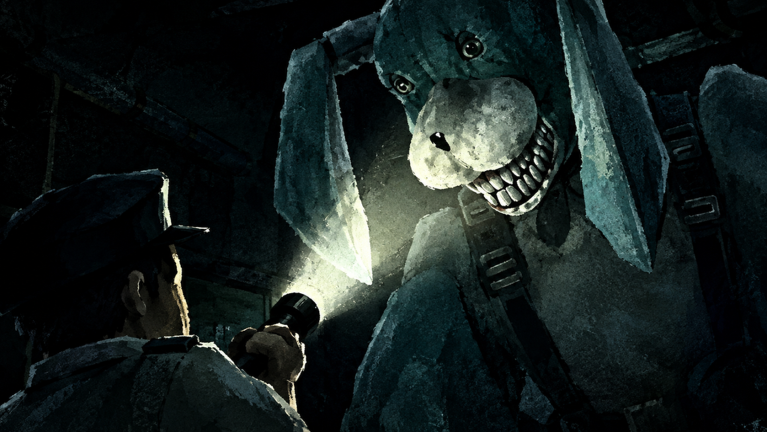
Keeping up after a new update in STAY ALIVE gets way easier when you have a solid STAY ALIVE script ready to roll. Playing smarter on mobile or PC saves you from losing your progress every time the killer gets too close.
This multiplayer horror hide and seek survival game drops you into a terrifying match against Bon the Rabbit from The Walten Files. Bon uses a smart killer AI to track you down everywhere you go, meaning you have to run, hide, and escape to stay alive. You can team up with friends or even sabotage other players to last longer, compete to be the last survivor, and buy powerful classes to upgrade your abilities.
If you want to try out the cool script with esp and avoider functions, we grabbed the working code you need right below.
STAY ALIVE Script – Working Script
local Workspace = game:GetService("Workspace")
local Players = game:GetService("Players")
local UserInputService = game:GetService("UserInputService")
local TweenService = game:GetService("TweenService")
local RunService = game:GetService("RunService")

local LocalPlayer = Players.LocalPlayer
local PlayerGui = LocalPlayer:WaitForChild("PlayerGui")
local Camera = Workspace.CurrentCamera

local monsterName = "Bon"
local bonEspEnabled = false
local playerEspEnabled = false
local bonAvoiderEnabled = false
local scriptActivated = false

local bonHighlights = {}
local playerHighlights = {}

-- Safe open-floor escape coordinates
local safeTeleportSpots = {
    Vector3.new(741.7, 26.2, -879.2),
    Vector3.new(669.56, 26.2, -665.42),
    Vector3.new(723.49, 26.2, -592.8),
    Vector3.new(473.9, 26.2, -693.09)
}

local lastTeleportTick = 0

-- transparent container and buttons
local screenGui = Instance.new("ScreenGui")
screenGui.Name = "DeviceSelection"
screenGui.ResetOnSpawn = false
screenGui.Parent = PlayerGui

local mainFrame = Instance.new("Frame")
mainFrame.Name = "MainFrame"
mainFrame.Size = UDim2.new(0, 310, 0, 160)
mainFrame.Position = UDim2.new(0.5, -155, 0.4, -80)
mainFrame.BackgroundTransparency = 1
mainFrame.BorderSizePixel = 0
mainFrame.Parent = screenGui

local titleLabel = Instance.new("TextLabel")
titleLabel.Name = "Title"
titleLabel.Size = UDim2.new(1, 0, 0, 30)
titleLabel.Position = UDim2.new(0, 0, 0, 10)
titleLabel.BackgroundTransparency = 1
titleLabel.Text = "Select Your Platform"
titleLabel.TextColor3 = Color3.fromRGB(240, 240, 245)
titleLabel.TextSize = 15
titleLabel.Font = Enum.Font.GothamMedium
titleLabel.Parent = mainFrame

-- PC Button
local pcBtn = Instance.new("TextButton")
pcBtn.Name = "PC"
pcBtn.Size = UDim2.new(0, 130, 0, 60)
pcBtn.Position = UDim2.new(0, 15, 0, 55)
pcBtn.BackgroundTransparency = 1
pcBtn.BorderSizePixel = 0
pcBtn.Text = "PC"
pcBtn.TextColor3 = Color3.fromRGB(240, 240, 245)
pcBtn.TextSize = 16
pcBtn.Font = Enum.Font.GothamBold
pcBtn.Parent = mainFrame

local pcSub = Instance.new("TextLabel")
pcSub.Size = UDim2.new(1, 0, 0, 20)
pcSub.Position = UDim2.new(0, 0, 1, -20)
pcSub.BackgroundTransparency = 1
pcSub.Text = "KeyBinds [I, P, K]"
pcSub.TextColor3 = Color3.fromRGB(160, 165, 175)
pcSub.TextSize = 12
pcSub.Font = Enum.Font.Gotham
pcSub.Parent = pcBtn

-- Mobile Button
local mobileBtn = Instance.new("TextButton")
mobileBtn.Name = "Mobile"
mobileBtn.Size = UDim2.new(0, 130, 0, 60)
mobileBtn.Position = UDim2.new(1, -145, 0, 55)
mobileBtn.BackgroundTransparency = 1
mobileBtn.BorderSizePixel = 0
mobileBtn.Text = "Mobile"
mobileBtn.TextColor3 = Color3.fromRGB(240, 240, 245)
mobileBtn.TextSize = 16
mobileBtn.Font = Enum.Font.GothamBold
mobileBtn.Parent = mainFrame

local mobileSub = Instance.new("TextLabel")
mobileSub.Size = UDim2.new(1, 0, 0, 20)
mobileSub.Position = UDim2.new(0, 0, 1, -20)
mobileSub.BackgroundTransparency = 1
mobileSub.Text = "Highlight Default"
mobileSub.TextColor3 = Color3.fromRGB(160, 165, 175)
mobileSub.TextSize = 12
mobileSub.Font = Enum.Font.Gotham
mobileSub.Parent = mobileBtn

-- Function to show PC Avoider status popup
local function showPcAvoiderStatus(isOn)
    local oldStatus = PlayerGui:FindFirstChild("PcAvoiderStatusGUI")
    if oldStatus then oldStatus:Destroy() end

    local statusGui = Instance.new("ScreenGui")
    statusGui.Name = "PcAvoiderStatusGUI"
    statusGui.ResetOnSpawn = false
    statusGui.DisplayOrder = 999
    statusGui.Parent = PlayerGui

    local statusFrame = Instance.new("Frame")
    statusFrame.Size = UDim2.new(0, 200, 0, 40)
    statusFrame.Position = UDim2.new(0.5, -100, 0.25, 0)
    statusFrame.BackgroundTransparency = 1
    statusFrame.BorderSizePixel = 0
    statusFrame.Parent = statusGui

    local statusLabel = Instance.new("TextLabel")
    statusLabel.Size = UDim2.new(1, 0, 1, 0)
    statusLabel.BackgroundTransparency = 1
    statusLabel.Text = isOn and "Avoider: ON" or "Avoider: OFF"
    statusLabel.TextColor3 = isOn and Color3.fromRGB(240, 240, 245) or Color3.fromRGB(180, 185, 195)
    statusLabel.TextTransparency = 1
    statusLabel.TextSize = 15
    statusLabel.Font = Enum.Font.GothamMedium
    statusLabel.Parent = statusFrame

    task.spawn(function()
        local fadeIn = TweenInfo.new(0.3, Enum.EasingStyle.Quad, Enum.EasingDirection.Out)
        TweenService:Create(statusLabel, fadeIn, {TextTransparency = 0}):Play()

        task.wait(1.5)

        local fadeOut = TweenInfo.new(0.5, Enum.EasingStyle.Quad, Enum.EasingDirection.Out)
        local tweenOut = TweenService:Create(statusLabel, fadeOut, {TextTransparency = 1})
        tweenOut:Play()
        tweenOut.Completed:Connect(function()
            statusGui:Destroy()
        end)
    end)
end

-- Smooth toggle fade for Bon ESP
local function toggleBonEsp(state)
    bonEspEnabled = state
    for _, hl in ipairs(bonHighlights) do
        if hl and hl.Parent then
            if state then
                hl.Enabled = true
                hl.FillTransparency = 1
                hl.OutlineTransparency = 1
                task.spawn(function()
                    local duration = 0.5
                    local elapsed = 0
                    while elapsed < duration and bonEspEnabled do
                        local alpha = elapsed / duration
                        hl.FillTransparency = 1 - (alpha * (1 - 0.85))
                        hl.OutlineTransparency = 1 - (alpha * (1 - 0.0))
                        elapsed = elapsed + RunService.RenderStepped:Wait()
                    end
                    if bonEspEnabled then
                        hl.FillTransparency = 0.85
                        hl.OutlineTransparency = 0.0
                    end
                end)
            else
                task.spawn(function()
                    local duration = 0.5
                    local elapsed = 0
                    while elapsed < duration and not bonEspEnabled do
                        local alpha = elapsed / duration
                        hl.FillTransparency = 0.85 + (alpha * (1 - 0.85))
                        hl.OutlineTransparency = 0.0 + (alpha * (1 - 0.0))
                        elapsed = elapsed + RunService.RenderStepped:Wait()
                    end
                    if not bonEspEnabled then
                        hl.Enabled = false
                    end
                end)
            end
        end
    end
end

local function togglePlayerEsp(state)
    playerEspEnabled = state
end

-- Teleport function: finds the safe spot furthest away from Bon
local function triggerBonAvoiderTeleport()
    local char = LocalPlayer.Character
    if not char or not char:FindFirstChild("HumanoidRootPart") then return end
    local myRoot = char.HumanoidRootPart

    local bonPosition = nil
    for _, desc in ipairs(Workspace:GetDescendants()) do
        if desc.Name == monsterName and desc:IsA("Model") then
            local monsterRoot = desc:FindFirstChild("HumanoidRootPart") or desc.PrimaryPart
            if monsterRoot then
                bonPosition = monsterRoot.Position
                break
            end
        end
    end

    local bestSpot = safeTeleportSpots[1]
    local maxDistance = -1

    for _, spot in ipairs(safeTeleportSpots) do
        local distFromBon = bonPosition and (spot - bonPosition).Magnitude or 0
        local distFromMe = (spot - myRoot.Position).Magnitude

        local score = distFromBon + (distFromMe * 0.2)
        if score > maxDistance then
            maxDistance = score
            bestSpot = spot
        end
    end

    myRoot.CFrame = CFrame.new(bestSpot)
end

-- Create Custom Mobile Avoider Button with "don't mind me." Floating Animation
local function createMobileAvoiderButton(onFullyVisible)
    local mobGui = Instance.new("ScreenGui")
    mobGui.Name = "MobileAvoiderGUI"
    mobGui.ResetOnSpawn = false
    mobGui.DisplayOrder = 999
    mobGui.Parent = PlayerGui

    local avoidBtn = Instance.new("TextButton")
    avoidBtn.Name = "AvoidButton"
    avoidBtn.Size = UDim2.new(0, 56, 0, 56)
    avoidBtn.Position = UDim2.new(1, -135, 1, -150)
    avoidBtn.BackgroundColor3 = Color3.fromRGB(25, 25, 30)
    avoidBtn.BackgroundTransparency = 1
    avoidBtn.Text = "AVOID"
    avoidBtn.TextColor3 = Color3.fromRGB(255, 255, 255)
    avoidBtn.TextTransparency = 1
    avoidBtn.TextSize = 11
    avoidBtn.Font = Enum.Font.GothamBlack
    avoidBtn.AutoButtonColor = false
    avoidBtn.Parent = mobGui

    local corner = Instance.new("UICorner")
    corner.CornerRadius = UDim.new(1, 0)
    corner.Parent = avoidBtn

    local stroke = Instance.new("UIStroke")
    stroke.Transparency = 1
    stroke.Thickness = 2
    stroke.Color = Color3.fromRGB(60, 60, 70)
    stroke.Parent = avoidBtn

    local infoBtn = Instance.new("TextButton")
    infoBtn.Name = "InfoButton"
    infoBtn.Size = UDim2.new(0, 20, 0, 20)
    infoBtn.Position = UDim2.new(1, -6, 0, -2)
    infoBtn.BackgroundColor3 = Color3.fromRGB(90, 95, 105)
    infoBtn.BackgroundTransparency = 1
    infoBtn.Text = "?"
    infoBtn.TextColor3 = Color3.fromRGB(255, 255, 255)
    infoBtn.TextTransparency = 1
    infoBtn.TextSize = 11
    infoBtn.Font = Enum.Font.GothamBold
    infoBtn.AutoButtonColor = true
    infoBtn.Parent = avoidBtn

    local infoCorner = Instance.new("UICorner")
    infoCorner.CornerRadius = UDim.new(1, 0)
    infoCorner.Parent = infoBtn

    local infoPanel = Instance.new("Frame")
    infoPanel.Name = "InfoPanel"
    infoPanel.Size = UDim2.new(0, 200, 0, 90)
    infoPanel.Position = UDim2.new(1, -345, 1, -210)
    infoPanel.BackgroundTransparency = 1
    infoPanel.BorderSizePixel = 0
    infoPanel.Visible = false
    infoPanel.Parent = mobGui

    local infoText = Instance.new("TextLabel")
    infoText.Size = UDim2.new(1, 0, 1, 0)
    infoText.BackgroundTransparency = 1
    infoText.Text = "yo so basically this avoid button saves you when bon gets too close (within 35 studs). it teleports you to the safest spot instantly so you don't die!"
    infoText.TextColor3 = Color3.fromRGB(255, 255, 255)
    infoText.TextTransparency = 1
    infoText.TextSize = 12
    infoText.Font = Enum.Font.GothamBold
    infoText.TextWrapped = true
    infoText.TextXAlignment = Enum.TextXAlignment.Right
    infoText.TextYAlignment = Enum.TextYAlignment.Bottom
    infoText.Parent = infoPanel

    local textStroke = Instance.new("UIStroke")
    textStroke.Transparency = 1
    textStroke.Thickness = 1.5
    textStroke.Color = Color3.fromRGB(0, 0, 0)
    textStroke.Parent = infoText

    local funnyText = Instance.new("TextLabel")
    funnyText.Name = "FunnyFloatingText"
    funnyText.Size = UDim2.new(0, 100, 0, 25)
    funnyText.Position = UDim2.new(1, -157, 1, -165)
    funnyText.BackgroundTransparency = 1
    funnyText.Text = "don't mind me."
    funnyText.TextColor3 = Color3.fromRGB(200, 205, 215)
    funnyText.TextTransparency = 1
    funnyText.TextSize = 11
    funnyText.Font = Enum.Font.GothamMedium
    funnyText.TextXAlignment = Enum.TextXAlignment.Center
    funnyText.Parent = mobGui

    local funnyStroke = Instance.new("UIStroke")
    funnyStroke.Transparency = 1
    funnyStroke.Thickness = 1
    funnyStroke.Color = Color3.fromRGB(0, 0, 0)
    funnyStroke.Parent = funnyText

    local fadeInfo = TweenInfo.new(0.6, Enum.EasingStyle.Quad, Enum.EasingDirection.Out)
    local tween1 = TweenService:Create(avoidBtn, fadeInfo, {BackgroundTransparency = 0, TextTransparency = 0})
    local tween2 = TweenService:Create(stroke, fadeInfo, {Transparency = 0})
    local tween3 = TweenService:Create(infoBtn, fadeInfo, {BackgroundTransparency = 0, TextTransparency = 0})

    tween1:Play()
    tween2:Play()
    tween3:Play()

    tween1.Completed:Connect(function()
        if onFullyVisible then
            onFullyVisible()
        end

        task.spawn(function()
            TweenService:Create(funnyText, TweenInfo.new(0.4, Enum.EasingStyle.Quad), {TextTransparency = 0, Position = UDim2.new(1, -157, 1, -190)}):Play()
            TweenService:Create(funnyStroke, TweenInfo.new(0.4, Enum.EasingStyle.Quad), {Transparency = 0}):Play()

            task.wait(1.8)

            local vanishTween1 = TweenService:Create(funnyText, TweenInfo.new(0.8, Enum.EasingStyle.Quad), {TextTransparency = 1, Position = UDim2.new(1, -157, 1, -215)})
            local vanishTween2 = TweenService:Create(funnyStroke, TweenInfo.new(0.8, Enum.EasingStyle.Quad), {Transparency = 1})
            vanishTween1:Play()
            vanishTween2:Play()
            vanishTween1.Completed:Connect(function()
                funnyText:Destroy()
            end)
        end)
    end)

    local infoActiveTask = nil
    infoBtn.MouseButton1Click:Connect(function()
        if infoPanel.Visible then
            infoPanel.Visible = false
            if infoActiveTask then task.cancel(infoActiveTask) end
        else
            infoPanel.Visible = true
            infoText.TextTransparency = 1
            textStroke.Transparency = 1

            TweenService:Create(infoText, TweenInfo.new(0.3, Enum.EasingStyle.Quad), {TextTransparency = 0}):Play()
            TweenService:Create(textStroke, TweenInfo.new(0.3, Enum.EasingStyle.Quad), {Transparency = 0}):Play()

            if infoActiveTask then task.cancel(infoActiveTask) end
            infoActiveTask = task.spawn(function()
                task.wait(4.5)
                if infoPanel.Visible then
                    local fadeOutText = TweenInfo.new(0.5, Enum.EasingStyle.Quad)
                    TweenService:Create(infoText, fadeOutText, {TextTransparency = 1}):Play()
                    TweenService:Create(textStroke, fadeOutText, {Transparency = 1}):Play()
                    task.wait(0.5)
                    infoPanel.Visible = false
                end
            end)
        end
    end)

    avoidBtn.MouseButton1Click:Connect(function()
        if not scriptActivated then return end
        bonAvoiderEnabled = not bonAvoiderEnabled
        if bonAvoiderEnabled then
            avoidBtn.BackgroundColor3 = Color3.fromRGB(240, 240, 245)
            avoidBtn.TextColor3 = Color3.fromRGB(15, 15, 20)
            stroke.Color = Color3.fromRGB(255, 255, 255)
        else
            avoidBtn.BackgroundColor3 = Color3.fromRGB(25, 25, 30)
            avoidBtn.TextColor3 = Color3.fromRGB(255, 255, 255)
            stroke.Color = Color3.fromRGB(60, 60, 70)
        end
    end)
end

-- fade out picker menu
local function closeMenu(isMobile, callback)
    local tInfo = TweenInfo.new(0.4, Enum.EasingStyle.Quad, Enum.EasingDirection.Out)

    TweenService:Create(titleLabel, tInfo, {TextTransparency = 1}):Play()
    TweenService:Create(pcBtn, tInfo, {TextTransparency = 1}):Play()
    TweenService:Create(pcSub, tInfo, {TextTransparency = 1}):Play()
    TweenService:Create(mobileBtn, tInfo, {TextTransparency = 1}):Play()
    TweenService:Create(mobileSub, tInfo, {TextTransparency = 1}):Play()

    task.wait(0.4)
    screenGui:Destroy()

    if callback then
        callback()
    end
end

-- credits popup
local function showCredits(isMobile, callback)
    local creditGui = Instance.new("ScreenGui")
    creditGui.Name = "ESP_Credits"
    creditGui.ResetOnSpawn = false
    creditGui.Parent = PlayerGui

    local creditFrame = Instance.new("Frame")
    creditFrame.Size = UDim2.new(0, 280, 0, 90)
    creditFrame.Position = UDim2.new(0.5, -140, 0.4, -45)
    creditFrame.BackgroundTransparency = 1
    creditFrame.Parent = creditGui

    local title = Instance.new("TextLabel")
    title.Size = UDim2.new(1, 0, 0, 22)
    title.BackgroundTransparency = 1
    title.Text = "Credits"
    title.TextColor3 = Color3.fromRGB(240, 240, 245)
    title.TextSize = 14
    title.Font = Enum.Font.GothamMedium
    title.Parent = creditFrame

    local desc = Instance.new("TextLabel")
    desc.Size = UDim2.new(1, 0, 0, 36)
    desc.Position = UDim2.new(0, 0, 0, 24)
    desc.BackgroundTransparency = 1
    desc.Text = "ScriptBlox User: SkibidigionSpyMega\nYouTube User: misterlolalaka"
    desc.TextColor3 = Color3.fromRGB(180, 185, 195)
    desc.TextSize = 12
    desc.Font = Enum.Font.Gotham
    desc.Parent = creditFrame

    local timer = Instance.new("TextLabel")
    timer.Size = UDim2.new(1, 0, 0, 18)
    timer.Position = UDim2.new(0, 0, 1, -18)
    timer.BackgroundTransparency = 1
    timer.Text = "Loading in 5s..."
    timer.TextColor3 = Color3.fromRGB(130, 135, 145)
    timer.TextSize = 11
    timer.Font = Enum.Font.Gotham
    timer.Parent = creditFrame

    task.spawn(function()
        for i = 5, 1, -1 do
            timer.Text = "Loading in " .. i .. "s..."
            task.wait(1)
        end

        local fade = TweenInfo.new(1, Enum.EasingStyle.Quad, Enum.EasingDirection.Out)
        TweenService:Create(title, fade, {TextTransparency = 1}):Play()
        TweenService:Create(desc, fade, {TextTransparency = 1}):Play()
        TweenService:Create(timer, fade, {TextTransparency = 1}):Play()

        task.wait(1)
        creditGui:Destroy()

        if isMobile then
            createMobileAvoiderButton(function()
                scriptActivated = true
                toggleBonEsp(true)
                togglePlayerEsp(true)
            end)
        else
            scriptActivated = true
        end

        if callback then
            callback()
        end
    end)
end

-- pc tip popup
local function showPcTip()
    local tipGui = Instance.new("ScreenGui")
    tipGui.Name = "ESP_Tip"
    tipGui.ResetOnSpawn = false
    tipGui.Parent = PlayerGui

    local tipFrame = Instance.new("Frame")
    tipFrame.Size = UDim2.new(0, 260, 0, 105)
    tipFrame.Position = UDim2.new(0.5, -130, 0.4, -50)
    tipFrame.BackgroundTransparency = 1
    tipFrame.Parent = tipGui

    local title = Instance.new("TextLabel")
    title.Size = UDim2.new(1, 0, 0, 22)
    title.BackgroundTransparency = 1
    title.Text = "Keybinds"
    title.TextColor3 = Color3.fromRGB(240, 240, 245)
    title.TextSize = 14
    title.Font = Enum.Font.GothamMedium
    title.Parent = tipFrame

    local desc = Instance.new("TextLabel")
    desc.Size = UDim2.new(1, 0, 0, 50)
    desc.Position = UDim2.new(0, 0, 0, 24)
    desc.BackgroundTransparency = 1
    desc.Text = "Press [I] for Bon ESP\nPress [P] for Player ESP\nPress [K] for Bon Avoider"
    desc.TextColor3 = Color3.fromRGB(180, 185, 195)
    desc.TextSize = 12
    desc.Font = Enum.Font.Gotham
    desc.Parent = tipFrame

    local timer = Instance.new("TextLabel")
    timer.Size = UDim2.new(1, 0, 0, 18)
    timer.Position = UDim2.new(0, 0, 1, -18)
    timer.BackgroundTransparency = 1
    timer.Text = "Disappearing in 7s..."
    timer.TextColor3 = Color3.fromRGB(130, 135, 145)
    timer.TextSize = 11
    timer.Font = Enum.Font.Gotham
    timer.Parent = tipFrame

    task.spawn(function()
        for i = 7, 1, -1 do
            timer.Text = "Disappearing in " .. i .. "s..."
            task.wait(1)
        end

        local fade = TweenInfo.new(1.2, Enum.EasingStyle.Quad, Enum.EasingDirection.Out)
        TweenService:Create(title, fade, {TextTransparency = 1}):Play()
        TweenService:Create(desc, fade, {TextTransparency = 1}):Play()
        TweenService:Create(timer, fade, {TextTransparency = 1}):Play()

        task.wait(1.2)
        tipGui:Destroy()
    end)
end

-- mobile notification popup
local function showMobileTip()
    local tipGui = Instance.new("ScreenGui")
    tipGui.Name = "ESP_Tip"
    tipGui.ResetOnSpawn = false
    tipGui.Parent = PlayerGui

    local tipFrame = Instance.new("Frame")
    tipFrame.Size = UDim2.new(0, 260, 0, 90)
    tipFrame.Position = UDim2.new(0.5, -130, 0.4, -45)
    tipFrame.BackgroundTransparency = 1
    tipFrame.Parent = tipGui

    local title = Instance.new("TextLabel")
    title.Size = UDim2.new(1, 0, 0, 22)
    title.BackgroundTransparency = 1
    title.Text = "Mobile Status"
    title.TextColor3 = Color3.fromRGB(240, 240, 245)
    title.TextSize = 14
    title.Font = Enum.Font.GothamMedium
    title.Parent = tipFrame

    local desc = Instance.new("TextLabel")
    desc.Size = UDim2.new(1, 0, 0, 36)
    desc.Position = UDim2.new(0, 0, 0, 24)
    desc.BackgroundTransparency = 1
    desc.Text = "Bon ESP is ON\nPlayer ESP is ON"
    desc.TextColor3 = Color3.fromRGB(180, 185, 195)
    desc.TextSize = 12
    desc.Font = Enum.Font.Gotham
    desc.Parent = tipFrame

    local timer = Instance.new("TextLabel")
    timer.Size = UDim2.new(1, 0, 0, 18)
    timer.Position = UDim2.new(0, 0, 1, -18)
    timer.BackgroundTransparency = 1
    timer.Text = "Disappearing in 7s..."
    timer.TextColor3 = Color3.fromRGB(130, 135, 145)
    timer.TextSize = 11
    timer.Font = Enum.Font.Gotham
    timer.Parent = tipFrame

    task.spawn(function()
        for i = 7, 1, -1 do
            timer.Text = "Disappearing in " .. i .. "s..."
            task.wait(1)
        end

        local fade = TweenInfo.new(1.2, Enum.EasingStyle.Quad, Enum.EasingDirection.Out)
        TweenService:Create(title, fade, {TextTransparency = 1}):Play()
        TweenService:Create(desc, fade, {TextTransparency = 1}):Play()
        TweenService:Create(timer, fade, {TextTransparency = 1}):Play()

        task.wait(1.2)
        tipGui:Destroy()
    end)
end

-- button triggers
pcBtn.MouseButton1Click:Connect(function()
    closeMenu(false, function()
        showCredits(false, function()
            showPcTip()
        end)
    end)
end)

mobileBtn.MouseButton1Click:Connect(function()
    closeMenu(true, function()
        showCredits(true, function()
            showMobileTip()
        end)
    end)
end)

-- Monster Highlight Setup
local function applyMonsterHighlight(model)
    if model.Name == monsterName and model:IsA("Model") then
        local oldHl = model:FindFirstChild("MonsterTrackerHighlight")
        if oldHl then oldHl:Destroy() end

        local highlight = Instance.new("Highlight")
        highlight.Name = "MonsterTrackerHighlight"
        highlight.Adornee = model
        highlight.FillColor = Color3.fromRGB(255, 0, 0)
        highlight.OutlineColor = Color3.fromRGB(255, 50, 50)
        highlight.FillTransparency = 1
        highlight.OutlineTransparency = 1
        highlight.Enabled = false
        highlight.Parent = model
        table.insert(bonHighlights, highlight)
    end
end

for _, desc in ipairs(Workspace:GetDescendants()) do
    if desc.Name == monsterName and desc:IsA("Model") then
        applyMonsterHighlight(desc)
    end
end

Workspace.DescendantAdded:Connect(function(desc)
    if desc.Name == monsterName and desc:IsA("Model") then
        applyMonsterHighlight(desc)
    end
end)

-- Player ESP Logic
local function applyPlayerHighlight(character, player)
    if not character or character == LocalPlayer.Character then return end

    local oldHl = character:FindFirstChild("PlayerTrackerHighlight")
    if oldHl then oldHl:Destroy() end

    local highlight = Instance.new("Highlight")
    highlight.Name = "PlayerTrackerHighlight"
    highlight.Adornee = character
    highlight.FillColor = Color3.fromRGB(0, 210, 255)
    highlight.OutlineColor = Color3.fromRGB(200, 240, 255)
    highlight.FillTransparency = 1
    highlight.OutlineTransparency = 1
    highlight.Enabled = false
    highlight.Parent = character
    table.insert(playerHighlights, highlight)

    local humanoid = character:WaitForChild("Humanoid", 5)
    if humanoid then
        humanoid.Died:Connect(function()
            -- Quick fade out on death
            task.spawn(function()
                while highlight.FillTransparency < 1 do
                    highlight.FillTransparency = math.min(1, highlight.FillTransparency + 0.15)
                    highlight.OutlineTransparency = math.min(1, highlight.OutlineTransparency + 0.15)
                    RunService.RenderStepped:Wait()
                end
                highlight.Enabled = false
            end)
        end)
    end
end

local function setupPlayer(player)
    if player == LocalPlayer then return end
    if player.Character then applyPlayerHighlight(player.Character, player) end
    player.CharacterAdded:Connect(function(char)
        applyPlayerHighlight(char, player)
    end)
end

for _, plr in ipairs(Players:GetPlayers()) do
    setupPlayer(plr)
end

Players.PlayerAdded:Connect(setupPlayer)

-- Screen-aware view loop (SLOW fade in when looking at players, FAST fade out when looking away)
RunService.RenderStepped:Connect(function()
    if not scriptActivated then return end

    -- Player ESP Loop (Screen-aware fade)
    for _, hl in ipairs(playerHighlights) do
        if hl and hl.Parent and hl.Adornee then
            local char = hl.Adornee
            local rootPart = char:FindFirstChild("HumanoidRootPart") or char.PrimaryPart
            local humanoid = char:FindFirstChildOfClass("Humanoid")

            local isOnScreen = false
            if playerEspEnabled and rootPart and humanoid and humanoid.Health > 0 then
                local _, inViewport = Camera:WorldToViewportPoint(rootPart.Position)
                isOnScreen = inViewport
            end

            if isOnScreen then
                if not hl.Enabled then hl.Enabled = true end
                if hl.FillTransparency > 0.6 then
                    hl.FillTransparency = math.max(0.6, hl.FillTransparency - 0.015)
                    hl.OutlineTransparency = math.max(0.2, hl.OutlineTransparency - 0.008)
                end
            else
                if hl.Enabled and hl.FillTransparency < 1 then
                    hl.FillTransparency = math.min(1, hl.FillTransparency + 0.12)
                    hl.OutlineTransparency = math.min(1, hl.OutlineTransparency + 0.12)
                    if hl.FillTransparency >= 1 then
                        hl.Enabled = false
                    end
                end
            end
        end
    end
end)

-- Bon Avoider Proximity Check & Teleport Loop (Heartbeat) - Set to 35 studs
RunService.Heartbeat:Connect(function()
    if not scriptActivated or not bonAvoiderEnabled then return end

    local char = LocalPlayer.Character
    if not char or not char:FindFirstChild("HumanoidRootPart") then return end
    local myRoot = char.HumanoidRootPart

    for _, desc in ipairs(Workspace:GetDescendants()) do
        if desc.Name == monsterName and desc:IsA("Model") then
            local monsterRoot = desc:FindFirstChild("HumanoidRootPart") or desc.PrimaryPart
            if monsterRoot then
                local distance = (myRoot.Position - monsterRoot.Position).Magnitude

                if distance < 35 then
                    local now = tick()
                    if now - lastTeleportTick > 1.5 then
                        lastTeleportTick = now
                        triggerBonAvoiderTeleport()
                    end
                end
            end
        end
    end
end)

-- PC keybind listener
UserInputService.InputBegan:Connect(function(input, gameProcessed)
    if gameProcessed or not scriptActivated then return end

    if input.KeyCode == Enum.KeyCode.I then
        toggleBonEsp(not bonEspEnabled)
    elseif input.KeyCode == Enum.KeyCode.P then
        togglePlayerEsp(not playerEspEnabled)
    elseif input.KeyCode == Enum.KeyCode.K then
        bonAvoiderEnabled = not bonAvoiderEnabled
        showPcAvoiderStatus(bonAvoiderEnabled)
    end
end)Copy the code above into a compatible Roblox script executor if you choose to test it.
STAY ALIVE Script Status
Roblox and game updates can affect compatibility, so the script’s status should be treated as temporary rather than guaranteed.
Frequently Asked Questions
What is a STAY ALIVE script?
A STAY ALIVE script is third-party Lua code intended to run alongside the Roblox game through a compatible script executor.
What features does this STAY ALIVE script include?
Different scripts contain different code and features. Check the script menu after it loads to see everything it offers.
How do you use the STAY ALIVE script?
Pick a compatible executor such as Hydrogen, MacSploit, AWP.GG, Delta, Fluxus, Codex, launch Roblox and join the game, copy the complete Lua code from the script card above, paste it into the executor’s editor, and click Run or Execute. Compatibility changes over time, so a name here doesn’t guarantee current support.
Can a STAY ALIVE script get your Roblox account banned?
Yes. Third-party scripts can violate Roblox rules and may put an account at risk. Only use code from a source you trust, never enter your Roblox password into a script or executor, and test on an alternate account first.
Does the STAY ALIVE script work on mobile?
Check whether both the executor and the script support your device and the current Roblox version. Mobile executor support does not guarantee that every script will work.

