
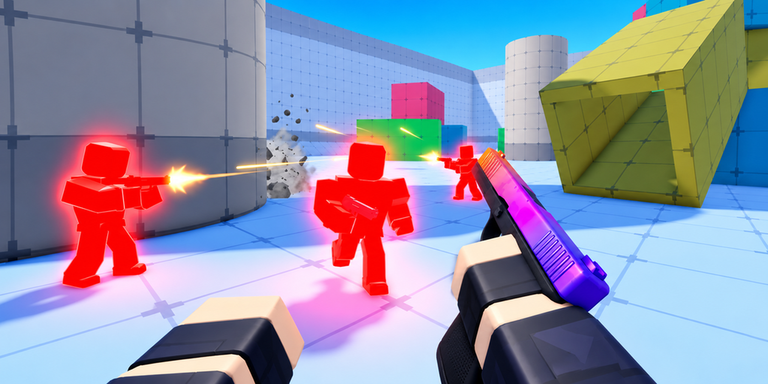
Keeping up after a new update gets tough when everyone else already has better reaction times, so using a ONE TAP PISTOLS script helps even the odds.
This fast-paced pistol arena requires a single clean shot to dominate, letting players stack up killstreaks, earn coins, and unlock rare skins while jumping right back into instant respawns.
You can grab the currently working code below to test out the open source silent aim and wallbang features right now.
ONE TAP PISTOLS Script – Working Script
local ReplicatedStorage = game:GetService("ReplicatedStorage")
local Workspace = game:GetService("Workspace")
local Players = game:GetService("Players")

local LocalPlayer = Players.LocalPlayer
local Character = LocalPlayer.Character or LocalPlayer.CharacterAdded:Wait()
local LocalRoot = Character.HumanoidRootPart
local Camera = Workspace.CurrentCamera

local FireResolver = require(ReplicatedStorage.CORE.Controllers.WeaponController.FireResolver)

local function GetClosestEntity()
	local Closest, Distance = nil, math.huge
	local Character = LocalPlayer.Character
	local LocalRoot = Character and Character:FindFirstChild("HumanoidRootPart")

	if not LocalRoot then
		return nil, math.huge
	end

	for _, Player in ipairs(Players:GetPlayers()) do
		if Player ~= LocalPlayer and Player.Character then
			local Model = Player.Character
			local Humanoid = Model:FindFirstChildOfClass("Humanoid")
			local HumanoidRootPart = Model:FindFirstChild("HumanoidRootPart")

			if
				Humanoid
				and HumanoidRootPart
				and Humanoid.Health > 0
				and not Model:FindFirstChildOfClass("ForceField")
			then
				local Magnitude = (LocalRoot.Position - HumanoidRootPart.Position).Magnitude
				if Magnitude < Distance then
					Distance = Magnitude
					Closest = Model
				end
			end
		end
	end

	local Bots = Workspace:FindFirstChild("Bots")
	if Bots then
		for _, Bot in ipairs(Bots:GetChildren()) do
			if Bot:IsA("Model") and Bot ~= Character then
				local Humanoid = Bot:FindFirstChildOfClass("Humanoid")
				local HumanoidRootPart = Bot:FindFirstChild("HumanoidRootPart")

				if
					Humanoid
					and HumanoidRootPart
					and Humanoid.Health > 0
					and not Bot:FindFirstChildOfClass("ForceField")
				then
					local Magnitude = (LocalRoot.Position - HumanoidRootPart.Position).Magnitude
					if Magnitude < Distance then
						Distance = Magnitude
						Closest = Bot
					end
				end
			end
		end
	end

	return Closest, Distance
end

local function GetMap()
	for _, Folder in pairs(Workspace:GetChildren()) do
		if Folder:FindFirstChild("Spawns") then
			return Folder
		end
	end

	return nil
end

LocalPlayer.CharacterAdded:Connect(function(Character)
	local Map = GetMap()

	if Map then
		local Geometry = Map:FindFirstChild("Map")

		if Geometry then
			Geometry.Parent = Character
		end
	end
end)

LocalPlayer.CharacterRemoving:Connect(function(Character)
	if Character:FindFirstChild("Map") then
		local Map = GetMap()

		if Map then
			Character:FindFirstChild("Map").Parent = Map
		else
			Character:FindFirstChild("Map"):Destroy()
		end
	end
end)

local Old
Old = hookfunction(FireResolver.ApplySpread, function(p5, p6, p7)
	local Closest = GetClosestEntity()
	local Direction = Vector3.new(0, 0, 0)

	if Closest and Closest:FindFirstChild("Head") then
		local ClosestDirection = (Closest.Head.Position - Camera.CFrame.Position).Unit
		local MathRadRet = math.rad(p6 and p6.BulletSpread or 0)
		local v9 = (math.random() - 0.5) * 2 * MathRadRet
		local v10 = (math.random() - 0.5) * 2 * MathRadRet

		Direction = (CFrame.fromAxisAngle(Camera.CFrame.UpVector, v9) * CFrame.fromAxisAngle(
			Camera.CFrame.RightVector,
			v10
		) * CFrame.new(Vector3.new(0, 0, 0), ClosestDirection)).LookVector
	end

	return Direction
end)Copy the code above into a compatible Roblox script executor if you choose to test it.
ONE TAP PISTOLS Script Status
Roblox and game updates can affect compatibility, so the script’s status should be treated as temporary rather than guaranteed.
Frequently Asked Questions
What is a ONE TAP PISTOLS script?
A ONE TAP PISTOLS script is third-party Lua code intended to run alongside the Roblox game through a compatible script executor.
What features does this ONE TAP PISTOLS script include?
Different scripts contain different code and features. Check the script menu after it loads to see everything it offers.
How do you use the ONE TAP PISTOLS script?
Pick a compatible executor such as Hydrogen, MacSploit, AWP.GG, Delta, Fluxus, Codex, launch Roblox and join the game, copy the complete Lua code from the script card above, paste it into the executor’s editor, and click Run or Execute. Compatibility changes over time, so a name here doesn’t guarantee current support.
Can a ONE TAP PISTOLS script get your Roblox account banned?
Yes. Third-party scripts can violate Roblox rules and may put an account at risk. Only use code from a source you trust, never enter your Roblox password into a script or executor, and test on an alternate account first.
Does the ONE TAP PISTOLS script work on mobile?
Check whether both the executor and the script support your device and the current Roblox version. Mobile executor support does not guarantee that every script will work.

