
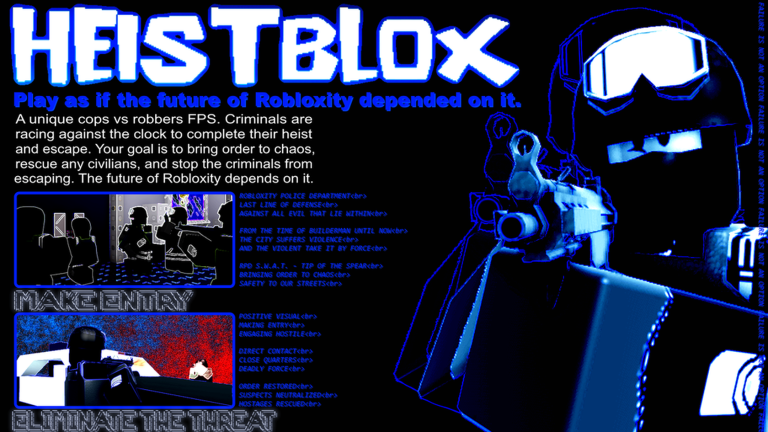
Playing smarter on mobile usually comes down to spotting targets through walls before they even turn the corner, and grabbing the new HEISTBLOX script gives you that exact edge.
The core gameplay drops you into a tense cops versus robbers shooter where criminals hit the bank for loot, civilians run down the clock with tasks, and police eventually spawn as SWAT to start massive gunfights. Since the extra tools here include an esp script that sometimes requires a manual toggle for loading nametags, you will want to know how to set it up properly.
Ready to grab the code and test out how it runs on your screen? Scroll down to find the working script right now.
HEISTBLOX Script – Working Script
-- HEISTBLOX INSPECTOR AIO v0.5
-- WindUI 1.6.66
-- Roblox Studio diagnostic edition

local Players = game:GetService("Players")
local Workspace = game:GetService("Workspace")
local RunService = game:GetService("RunService")

local LocalPlayer = Players.LocalPlayer
local PlayerGui = LocalPlayer:WaitForChild("PlayerGui")

-- CONFIGURATION

local Config = {
    PlayerESP = true,
    LootESP = true,
    WeaponInfo = true,
    RoleDetection = true,
    ShowDistance = true,

    Criminals = true,
    Police = true,
    Civilians = true,
    Unknown = true,

    RefreshRate = 1,
    MaxDistance = 1000,
}

local Colors = {
    Criminal = Color3.fromRGB(255, 50, 50),
    Police = Color3.fromRGB(0, 150, 255),
    Civilian = Color3.fromRGB(200, 200, 200),
    Unknown = Color3.fromRGB(255, 255, 255),
    Loot = Color3.fromRGB(255, 200, 50),
}

local RoleRGB = {
    ["255,50,50"] = "Criminal",
    ["0,150,255"] = "Police",
    ["200,200,200"] = "Civilian",
}

local RenderedPlayers = {}
local RenderedLoot = {}

local Stats = {
    Players = 0,
    Loot = 0,
    Refreshes = 0,
}

-- WINDUI

local WindUI = loadstring(game:HttpGet(
    "https://github.com/Footagesus/WindUI/releases/download/1.6.66/main.lua"
))()

local Window = WindUI:CreateWindow({
    Title = "HEISTBLOX | Inspector",
    Author = "AIO v0.5",
    Icon = "shield",
    Folder = "HeistbloxInspector",
    Theme = "Dark",
    Size = UDim2.fromOffset(700, 500),
    MinSize = Vector2.new(550, 400),
    Resizable = true,
    ToggleKey = Enum.KeyCode.RightShift,
})

local Dashboard = Window:Tab({
    Title = "Dashboard",
    Icon = "layout-dashboard",
})

local PlayersTab = Window:Tab({
    Title = "Players",
    Icon = "users",
})

local LootTab = Window:Tab({
    Title = "Loot",
    Icon = "package",
})

local SettingsTab = Window:Tab({
    Title = "Settings",
    Icon = "settings",
})

-- DETECTION

local function getRole(character)
    local highlight = character
        and character:FindFirstChild("SpectatorHighlight")

    if not highlight or not highlight:IsA("Highlight") then
        return "Unknown"
    end

    local color = highlight.FillColor

    local key = string.format("%d,%d,%d",
        math.round(color.R * 255),
        math.round(color.G * 255),
        math.round(color.B * 255)
    )

    return RoleRGB[key] or "Unknown"
end

local function getWeapons(player)
    local weapons = {}

    local function inspect(container)
        if not container then return end

        for _, item in ipairs(container:GetChildren()) do
            if item:IsA("Tool") then
                table.insert(weapons, item.Name)
            end
        end
    end

    inspect(player.Character)
    inspect(player:FindFirstChildOfClass("Backpack"))

    return #weapons > 0 and table.concat(weapons, ", ") or "Unarmed"
end

local function getDistance(character)
    local root = character
        and character:FindFirstChild("HumanoidRootPart")

    local localRoot = LocalPlayer.Character
        and LocalPlayer.Character:FindFirstChild("HumanoidRootPart")

    if not root or not localRoot then return nil end

    return math.floor((root.Position - localRoot.Position).Magnitude)
end

-- PLAYER RENDERER

local function removePlayer(player)
    local data = RenderedPlayers[player]

    if data then
        data.Billboard:Destroy()
        data.Highlight:Destroy()
        RenderedPlayers[player] = nil
    end
end

local function createPlayer(player)
    if player == LocalPlayer then return end

    local character = player.Character
    local root = character
        and character:FindFirstChild("HumanoidRootPart")

    if not root then return end

    removePlayer(player)

    local billboard = Instance.new("BillboardGui")
    billboard.Name = "InspectorPlayerLabel"
    billboard.Adornee = root
    billboard.Size = UDim2.fromOffset(230, 65)
    billboard.StudsOffset = Vector3.new(0, 3.5, 0)
    billboard.AlwaysOnTop = true
    billboard.MaxDistance = Config.MaxDistance

    local label = Instance.new("TextLabel")
    label.Size = UDim2.fromScale(1, 1)
    label.BackgroundTransparency = 1
    label.TextStrokeTransparency = 0.2
    label.Font = Enum.Font.GothamBold
    label.TextSize = 13
    label.Parent = billboard

    local highlight = Instance.new("Highlight")
    highlight.Adornee = character
    highlight.DepthMode = Enum.HighlightDepthMode.Occluded
    highlight.Parent = character

    billboard.Parent = PlayerGui

    RenderedPlayers[player] = {
        Billboard = billboard,
        Highlight = highlight,
        Label = label,
        Character = character,
    }
end

-- LOOT RENDERER

local function removeLoot(item)
    local data = RenderedLoot[item]

    if data then
        data.Billboard:Destroy()
        data.Highlight:Destroy()
        RenderedLoot[item] = nil
    end
end

local function createLoot(item)
    if not item:IsA("Model") and not item:IsA("BasePart") then
        return
    end

    local part = item:IsA("Model")
        and (item.PrimaryPart or item:FindFirstChildWhichIsA("BasePart"))
        or item

    if not part then return end

    local billboard = Instance.new("BillboardGui")
    billboard.Name = "InspectorLootLabel"
    billboard.Adornee = part
    billboard.Size = UDim2.fromOffset(180, 35)
    billboard.StudsOffset = Vector3.new(0, 2, 0)
    billboard.AlwaysOnTop = true
    billboard.MaxDistance = Config.MaxDistance

    local label = Instance.new("TextLabel")
    label.Size = UDim2.fromScale(1, 1)
    label.BackgroundTransparency = 1
    label.Text = item.Name
    label.TextColor3 = Colors.Loot
    label.TextStrokeTransparency = 0.2
    label.Font = Enum.Font.GothamBold
    label.TextSize = 12
    label.Parent = billboard

    local highlight = Instance.new("Highlight")
    highlight.Adornee = item
    highlight.DepthMode = Enum.HighlightDepthMode.Occluded
    highlight.FillColor = Colors.Loot
    highlight.OutlineColor = Colors.Loot
    highlight.Parent = item

    billboard.Parent = PlayerGui

    RenderedLoot[item] = {
        Billboard = billboard,
        Highlight = highlight,
    }
end

-- UPDATE ENGINE

local function update()
    Stats.Refreshes += 1
    Stats.Players = 0
    Stats.Loot = 0

    for _, player in ipairs(Players:GetPlayers()) do
        if player ~= LocalPlayer then
            local character = player.Character
            local root = character
                and character:FindFirstChild("HumanoidRootPart")

            if root then
                Stats.Players += 1

                local data = RenderedPlayers[player]

                if not data or data.Character ~= character then
                    createPlayer(player)
                    data = RenderedPlayers[player]
                end

                if data then
                    local role = Config.RoleDetection
                        and getRole(character) or "Unknown"

                    local allowed =
                        (role == "Criminal" and Config.Criminals)
                        or (role == "Police" and Config.Police)
                        or (role == "Civilian" and Config.Civilians)
                        or (role == "Unknown" and Config.Unknown)

                    local distance = getDistance(character)
                    local inRange = not distance
                        or distance <= Config.MaxDistance

                    local color = Colors[role] or Colors.Unknown

                    local text = player.DisplayName .. "\n" .. role

                    if Config.WeaponInfo then
                        text ..= "\n" .. getWeapons(player)
                    end

                    if Config.ShowDistance and distance then
                        text ..= " | " .. distance .. " studs"
                    end

                    data.Label.Text = text
                    data.Label.TextColor3 = color

                    data.Billboard.Enabled =
                        Config.PlayerESP and allowed and inRange

                    data.Highlight.Enabled =
                        Config.PlayerESP and allowed and inRange

                    data.Highlight.FillColor = color
                    data.Highlight.OutlineColor = color
                end
            else
                removePlayer(player)
            end
        end
    end

    local map = Workspace:FindFirstChild("ActiveMap")
    local folder = map and map:FindFirstChild("Loot")

    if folder then
        for _, item in ipairs(folder:GetChildren()) do
            if item:IsA("Model") or item:IsA("BasePart") then
                Stats.Loot += 1

                if not RenderedLoot[item] then
                    createLoot(item)
                end
            end
        end
    end

    for item in pairs(RenderedLoot) do
        if not item.Parent then
            removeLoot(item)
        else
            local data = RenderedLoot[item]

            data.Billboard.Enabled = Config.LootESP
            data.Highlight.Enabled = Config.LootESP
        end
    end
end

-- DASHBOARD GUI

Dashboard:Section({
    Title = "System Status",
    Box = true,
})

local DashboardParagraph = Dashboard:Paragraph({
    Title = "Inspector Status",
    Desc = "Initializing...",
})

Dashboard:Button({
    Title = "Refresh All",
    Icon = "refresh-cw",
    Callback = function()
        update()
    end,
})

-- PLAYER GUI

PlayersTab:Section({
    Title = "Player ESP",
    Box = true,
})

PlayersTab:Toggle({
    Title = "Enable Player ESP",
    Value = true,
    Callback = function(v)
        Config.PlayerESP = v
        update()
    end,
})

PlayersTab:Toggle({
    Title = "Criminals",
    Value = true,
    Callback = function(v)
        Config.Criminals = v
        update()
    end,
})

PlayersTab:Toggle({
    Title = "Police",
    Value = true,
    Callback = function(v)
        Config.Police = v
        update()
    end,
})

PlayersTab:Toggle({
    Title = "Civilians",
    Value = true,
    Callback = function(v)
        Config.Civilians = v
        update()
    end,
})

PlayersTab:Toggle({
    Title = "Show Weapons",
    Value = true,
    Callback = function(v)
        Config.WeaponInfo = v
        update()
    end,
})

PlayersTab:Toggle({
    Title = "Show Distance",
    Value = true,
    Callback = function(v)
        Config.ShowDistance = v
        update()
    end,
})

-- LOOT GUI

LootTab:Section({
    Title = "Loot ESP",
    Box = true,
})

LootTab:Toggle({
    Title = "Enable Loot ESP",
    Value = true,
    Callback = function(v)
        Config.LootESP = v
        update()
    end,
})

-- SETTINGS GUI

SettingsTab:Section({
    Title = "General Settings",
    Box = true,
})

SettingsTab:Slider({
    Title = "Refresh Rate",
    Value = {
        Min = 1,
        Max = 5,
        Default = 1,
    },
    Callback = function(v)
        Config.RefreshRate = v
    end,
})

SettingsTab:Slider({
    Title = "Maximum Distance",
    Value = {
        Min = 100,
        Max = 2000,
        Default = 1000,
    },
    Callback = function(v)
        Config.MaxDistance = v
        update()
    end,
})

SettingsTab:Toggle({
    Title = "Automatic Updates",
    Value = true,
    Callback = function(v)
        Config.AutoRefresh = v
    end,
})

-- PLAYER LIFECYCLE

Players.PlayerRemoving:Connect(function(player)
    removePlayer(player)
end)

Players.PlayerAdded:Connect(function(player)
    player.CharacterAdded:Connect(function()
        task.wait(1)
        update()
    end)
end)

-- MAIN LOOP

task.spawn(function()
    while Window do
        if Config.AutoRefresh then
            update()

            DashboardParagraph:SetDesc(string.format(
                "Status: Running\nPlayers: %d\nLoot: %d\nRefreshes: %d",
                Stats.Players,
                Stats.Loot,
                Stats.Refreshes
            ))
        end

        task.wait(Config.RefreshRate)
    end
end)

update()

WindUI:Notify({
    Title = "HEISTBLOX Inspector",
    Content = "AIO v0.5 initialized successfully.",
    Duration = 4,
})Copy the code above into a compatible Roblox script executor if you choose to test it.
HEISTBLOX Script Status
Roblox and game updates can affect compatibility, so the script’s status should be treated as temporary rather than guaranteed.
Frequently Asked Questions
What is a HEISTBLOX script?
A HEISTBLOX script is third-party Lua code intended to run alongside the Roblox game through a compatible script executor.
What features does this HEISTBLOX script include?
Different scripts contain different code and features. Check the script menu after it loads to see everything it offers.
How do you use the HEISTBLOX script?
Pick a compatible executor such as Hydrogen, MacSploit, AWP.GG, Delta, Fluxus, Codex, launch Roblox and join the game, copy the complete Lua code from the script card above, paste it into the executor’s editor, and click Run or Execute. Compatibility changes over time, so a name here doesn’t guarantee current support.
Can a HEISTBLOX script get your Roblox account banned?
Yes. Third-party scripts can violate Roblox rules and may put an account at risk. Only use code from a source you trust, never enter your Roblox password into a script or executor, and test on an alternate account first.
Does the HEISTBLOX script work on mobile?
Check whether both the executor and the script support your device and the current Roblox version. Mobile executor support does not guarantee that every script will work.

