Slowing down your casting speed on mobile is a fast way to lose matches, so using the DRAW SPELLS MAGIC ARENA script keeps you ahead of opponents who are still drawing by hand.
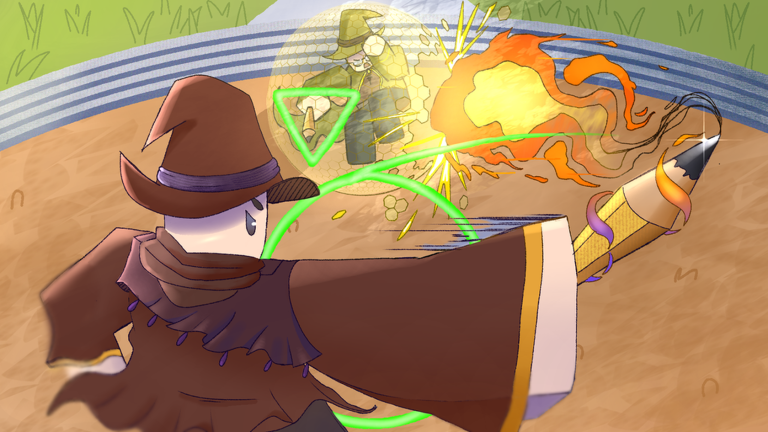
You battle other players by drawing shapes of spells and flinging them at enemies to see who is the fastest wizard, but skipping the drawing phase makes casting way faster.
Keep reading to grab the working script and start blasting your foes right now.
DRAW SPELLS MAGIC ARENA Script – ❗️❗️❗️ WORK ONLY FOR SPELLS THAT U OWN & More
local Rayfield = loadstring(game:HttpGet('https://sirius.menu/rayfield'))()

local Window = Rayfield:CreateWindow({
   Name = "🎯 Draw Spells Quick Cast | by opaopaky",
   LoadingTitle = "Loading quick buttons...",
   ConfigurationSaving = { Enabled = false },
   KeySystem = false,
})

local ReplicatedStorage = game:GetService("ReplicatedStorage")
local Players = game:GetService("Players")
local LocalPlayer = Players.LocalPlayer
local UserInputService = game:GetService("UserInputService")

-- Создаем ScreenGui для хранения плавающих кнопок
local CoreGui = game:GetService("CoreGui")
local QuickGui = CoreGui:FindFirstChild("DrawSpellsQuickCast") or Instance.new("ScreenGui")
QuickGui.Name = "DrawSpellsQuickCast"
QuickGui.Parent = CoreGui

local activeButtons = {}
local isLocked = false -- Флаг закрепления кнопок

-- Функция каста
local function CastSpellFull(spellName)
    local char = LocalPlayer.Character
    if not char or not char:FindFirstChild("HumanoidRootPart") then return end

    local hrp = char.HumanoidRootPart
    local origin = hrp.Position + Vector3.new(0, 2, 0)
    local direction = hrp.CFrame.LookVector
    local targetPos = origin + (direction * 100)
    local currentCFrame = hrp.CFrame

    pcall(function() ReplicatedStorage:WaitForChild("DrawModeOpened"):FireServer() end)
    task.wait(0.01)

    pcall(function()
        ReplicatedStorage:WaitForChild("StrokePoint"):FireServer(-0.01, 0.29, currentCFrame)
    end)
    task.wait(0.01)

    pcall(function() ReplicatedStorage:WaitForChild("StrokeEnd"):FireServer() end)
    task.wait(0.01)

    pcall(function()
        ReplicatedStorage:WaitForChild("CastSpell"):FireServer(
            spellName,
            origin,
            direction,
            targetPos,
            targetPos
        )
    end)

    if spellName == "BulletStorm" then
        pcall(function()
            ReplicatedStorage:WaitForChild("BulletStormShot"):FireServer(origin, direction)
        end)
    end

    pcall(function()
        ReplicatedStorage:WaitForChild("DrawModeClosed"):FireServer()
        ReplicatedStorage:WaitForChild("ExitDrawMode"):FireServer()
    end)
end

-- Функция создания перемещаемой (плавающей) кнопки
local function CreateFloatingButton(displayName, spellName)
    if activeButtons[spellName] then return end

    local btn = Instance.new("TextButton")
    btn.Name = spellName .. "QuickBtn"
    btn.Size = UDim2.new(0, 70, 0, 70)
    btn.Position = UDim2.new(0.5, -35, 0.4, 0) -- В центре экрана по умолчанию
    btn.BackgroundColor3 = Color3.fromRGB(35, 35, 45)
    btn.TextColor3 = Color3.fromRGB(255, 255, 255)
    btn.Text = displayName
    btn.TextSize = 12
    btn.TextWrapped = true
    btn.Font = Enum.Font.SourceSansBold
    btn.Parent = QuickGui

    -- Скругление углов и обводка
    local corner = Instance.new("UICorner")
    corner.CornerRadius = UDim.new(0, 14)
    corner.Parent = btn

    local stroke = Instance.new("UIStroke")
    stroke.Color = Color3.fromRGB(0, 170, 255)
    stroke.Thickness = 2
    stroke.Parent = btn

    -- Логика перетаскивания (Drag & Drop)
    local dragging = false
    local dragInput, dragStart, startPos

    btn.InputBegan:Connect(function(input)
        if (input.UserInputType == Enum.UserInputType.MouseButton1 or input.UserInputType == Enum.UserInputType.Touch) and not isLocked then
            dragging = true
            dragStart = input.Position
            startPos = btn.Position

            input.Changed:Connect(function()
                if input.UserInputState == Enum.UserInputState.End then
                    dragging = false
                end
            end)
        end
    end)

    btn.InputChanged:Connect(function(input)
        if (input.UserInputType == Enum.UserInputType.MouseMovement or input.UserInputType == Enum.UserInputType.Touch) then
            dragInput = input
        end
    end)

    UserInputService.InputChanged:Connect(function(input)
        if input == dragInput and dragging then
            local delta = input.Position - dragStart
            btn.Position = UDim2.new(startPos.X.Scale, startPos.X.Offset + delta.X, startPos.Y.Scale, startPos.Y.Offset + delta.Y)
        end
    end)

    -- Быстрый каст при клике/тапе
    btn.MouseButton1Click:Connect(function()
        CastSpellFull(spellName)
    end)

    activeButtons[spellName] = btn
end

-- Функция удаления плавающей кнопки
local function RemoveFloatingButton(spellName)
    if activeButtons[spellName] then
        activeButtons[spellName]:Destroy()
        activeButtons[spellName] = nil
    end
end

-- ==================== Вкладка Настроек Кнопок ====================
local SettingsTab = Window:CreateTab("⚙️ Button Settings", 4483362458)

SettingsTab:CreateToggle({
   Name = "🔒 Lock Buttons (Disable Dragging)",
   CurrentValue = false,
   Callback = function(Value)
      isLocked = Value
   end,
})

-- ==================== Функция создания элементов в меню ====================
local function AddSpellControls(tab, displayName, spellName)
    tab:CreateSection(displayName)

    tab:CreateButton({
        Name = "⚡ Instant Cast from Menu",
        Callback = function() CastSpellFull(spellName) end,
    })

    tab:CreateToggle({
        Name = "📌 Enable Floating Button",
        CurrentValue = false,
        Callback = function(Value)
            if Value then
                CreateFloatingButton(displayName, spellName)
            else
                RemoveFloatingButton(spellName)
            end
        end,
    })
end

-- ==================== Вкладки Заклинаний ====================
local OffensiveTab = Window:CreateTab("⚔️ Attack", 4483362458)
local offensiveSpells = {
    {"🔥 FireBall", "FireBall"},
    {"💥 BulletStorm", "BulletStorm"},
    {"⚡ EnergyBeam", "EnergyBeam"},
    {"⚡ LightningStrike", "LightningStrike"},
    {"🌑 BlackHole", "BlackHole"},
    {"🪨 Earthshatter", "Earthshatter"},
    {"🌪️ Hurricane", "Hurricane"},
    {"🗡️ Gladiator", "Gladiator"},
    {"🩸 LifeLeech", "LifeLeech"},
    {"💀 SkeletonLegion", "SkeletonLegion"}
}
for _, spell in ipairs(offensiveSpells) do
    AddSpellControls(OffensiveTab, spell[1], spell[2])
end

local DefensiveTab = Window:CreateTab("🛡️ Defense", 4483362458)
local defSpells = {
    {"🛡️ SpellShield", "SpellShield"},
    {"🪨 StoneBulwark", "StoneBulwark"},
    {"🪞 Reflect", "Reflect"}
}
for _, spell in ipairs(defSpells) do
    AddSpellControls(DefensiveTab, spell[1], spell[2])
end

local UtilityTab = Window:CreateTab("✨ Utility", 4483362458)
local utilSpells = {
    {"❤️ HolyHeal", "HolyHeal"},
    {"🏃 SpeedBoost", "SpeedBoost"},
    {"✨ Blink", "Blink"},
    {"🕊️ Flight", "Flight"},
    {"⏪ Rewind", "Rewind"}
}
for _, spell in ipairs(utilSpells) do
    AddSpellControls(UtilityTab, spell[1], spell[2])
end

local ControlTab = Window:CreateTab("🌀 Control", 4483362458)
local ctrlSpells = {
    {"❄️ Freeze", "Freeze"},
    {"👁️ Invisibility", "Invisibility"},
    {"😵 Blind", "Blind"},
    {"🌀 Confusion", "Confusion"},
    {"👥 ShadowClone", "ShadowClone"},
    {"🔮 Telekinesis", "Telekinesis"},
    {"♾️ Infinity", "Infinity"}
}
for _, spell in ipairs(ctrlSpells) do
    AddSpellControls(ControlTab, spell[1], spell[2])
endCopy the code above into a compatible Roblox script executor if you choose to test it.
DRAW SPELLS MAGIC ARENA Script Status
Roblox and game updates can affect compatibility, so the script’s status should be treated as temporary rather than guaranteed.
Frequently Asked Questions
What is a DRAW SPELLS MAGIC ARENA script?
A DRAW SPELLS MAGIC ARENA script is third-party Lua code intended to run alongside the Roblox game through a compatible script executor.
What features does this DRAW SPELLS MAGIC ARENA script include?
Different scripts contain different code. This version includes: ❗️❗️❗️ WORK ONLY FOR SPELLS THAT U OWN.
How do you use the DRAW SPELLS MAGIC ARENA script?
Pick a compatible executor such as Hydrogen, MacSploit, AWP.GG, Delta, Fluxus, Codex, launch Roblox and join the game, copy the complete Lua code from the script card above, paste it into the executor’s editor, and click Run or Execute. Compatibility changes over time, so a name here doesn’t guarantee current support.
Can a DRAW SPELLS MAGIC ARENA script get your Roblox account banned?
Yes. Third-party scripts can violate Roblox rules and may put an account at risk. Only use code from a source you trust, never enter your Roblox password into a script or executor, and test on an alternate account first.
Does the DRAW SPELLS MAGIC ARENA script work on mobile?
Check whether both the executor and the script support your device and the current Roblox version. Mobile executor support does not guarantee that every script will work.

