
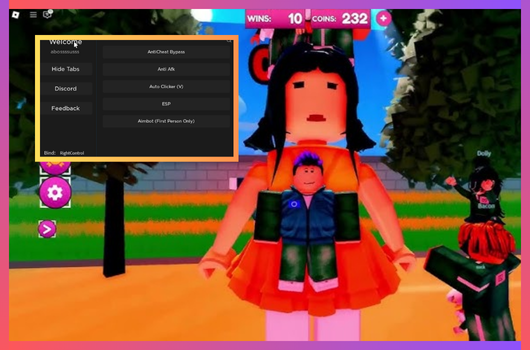
- 2026-10-23 — Added Script #3: Snowy Hub.
- 2026-10-22 — Added Script #2: Auto Minigames & More.
Full List of OP Scripts:
local Library = loadstring(game:HttpGet("https://raw.githubusercontent.com/xHeptc/Kavo-UI-Library/main/source.lua"))()
local Window = Library.CreateLib("Squid Game GUI", "DarkTheme")
local Tab = Window:NewTab("Main")
local Section = Tab:NewSection("Main")
Section:NewButton(
"TugWar Auto Jumper",
"Keybind to toggle: J",
function()
local waitt = 0.01
local autoclickKey = "j"
print("AutoClick Keybind is: ", autoclickKey)
toggle = true
m = game.Players.LocalPlayer:GetMouse()
m.KeyDown:connect(
function(key)
key = string.lower(key)
if key == autoclickKey then
if toggle then
toggle = false
else
toggle = true
while toggle == true do
wait(waitt)
print("Jumped")
game.workspace.Map.TugOfWar.Remotes.HakerPT:FireServer()
end
end
end
end
)
end
)
Section:NewButton(
"Reward TP",
"RL,GL-keep running after winning to confuse people",
function()
local playerLocal = game.Players.LocalPlayer
local leHuman
if game.Workspace[tostring(playerLocal)].HumanoidRootPart then
leHuman = game.Workspace[tostring(playerLocal)].HumanoidRootPart
end
local tp = leHuman.CFrame
for a, b in pairs(game.ReplicatedStorage.Shared.Maps:GetChildren()) do
print(a, b)
if leHuman then
leHuman.CFrame = game.ReplicatedStorage.Shared.Maps[tostring(b)].Reward.CFrame
wait(0.5)
leHuman.CFrame = tp
else
wait(0.2)
end
end
end
)
Section:NewButton(
"FP Camera",
"First Person Camera",
function()
local playerLocal = game.Players.LocalPlayer
playerLocal.CameraMode = Enum.CameraMode.LockFirstPerson
end
)
Section:NewButton(
"TP Camera",
"Third Person Camera",
function()
local playerLocal = game.Players.LocalPlayer
playerLocal.CameraMode = Enum.CameraMode.Classic
end
)


loadstring(game:HttpGet("https://raw.githubusercontent.com/IAmJamal10/Scripts/refs/heads/main/Squid"))()

The key:NiceGame83927Squid!!
It'll change soon if the script received some updates


loadstring(game:HttpGet("https://raw.githubusercontent.com/ToraScript/Script/main/SquidGameX"))()Script #2 Auto Minigames & More
loadstring(game:HttpGet("https://gist.githubusercontent.com/raw/1c3eaa6c2b355f89ef21a2bd0085c8e4/l_becbd6.lua", true))()Script #3 Snowy Hub
loadstring(game:HttpGet("https://flowauth.net/v1/ui/a87f00d9adf63658655fcd02ab86a4ef.lua"))()[🌈PENTA/🚪MINGLE] Squid Game X Script Features:
Here’s the full list of MINGLE script features:
- Auto Win Red Light – Instantly bypass red-light challenges.
- Green Light Auto Pass – Automates green-light movement success.
- Glass Bridge Solver – Safely crosses glass bridges.
- Infinite Coins Boost – Provides unlimited coins.
- Win Multiplier Boost – Ensures consistent win increases.
How to use [🌈PENTA/🚪MINGLE] Squid Game X scripts?
- Download a Script Executor – Tools like Delta, Hydrogen, Kiwi, Fluxus, or Codex.
- Attach the Executor – Connect the tool to the game process.
- Paste the Script – Load and execute the Lua script inside the game.
- Activate Features – Tap the execute icon to use the injected script for custom actions.
Game Details:
- Name: MINGLE
- Developer: redifi
- Maturity: Minimal
- Genre: Casual
- Subgenre: Survival
Frequently Asked Questions
What is a Squid Game X script?
A Squid Game X script is third-party Lua code intended to run alongside the Roblox game through a compatible script executor.
What features does this Squid Game X script include?
Different scripts contain different code. This version includes: ESP, Teleport, Infinite Money, Auto Click, Snowy Hub: Squid Game X, Auto Queue, Auto Win, Auto Walk, Auto Stop, Glass Bridge Bypass, Safe Sky Platform, Auto Revive, Auto Ready Up, Auto Skip Cutscenes, Auto Collect Weapons & Ammo, Auto Claim Missions.
How do you use the Squid Game X script?
Pick a compatible executor such as Hydrogen, MacSploit, AWP.GG, Delta, Fluxus, Codex, launch Roblox and join the game, copy the complete Lua code from the script card above, paste it into the executor’s editor, and click Run or Execute. Compatibility changes over time, so a name here doesn’t guarantee current support.
Can a Squid Game X script get your Roblox account banned?
Yes. Third-party scripts can violate Roblox rules and may put an account at risk. Only use code from a source you trust, never enter your Roblox password into a script or executor, and test on an alternate account first.
Does the Squid Game X script work on mobile?
Check whether both the executor and the script support your device and the current Roblox version. Mobile executor support does not guarantee that every script will work.

