A new Roblox event item has quietly dropped through Microsoft Rewards, and barely anyone is talking about it.
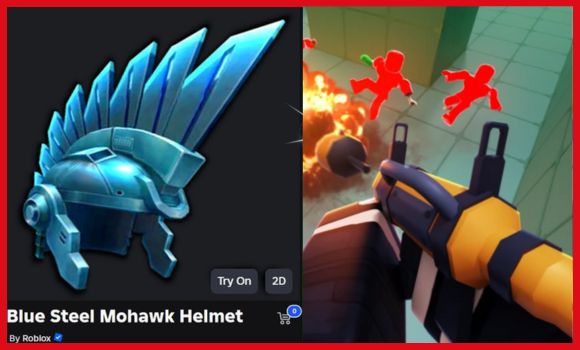
If you’ve seen players wearing the Blue Steel Mohawk Helmet, yes — it’s real, and yes — you can get it for free.
It doesn’t have any special effects, but it’s a clean-looking accessory and works great for futuristic or tech-style avatars.
Here’s how to claim it, how long the event lasts, and what you need to do each day.
What You Need First
You’ll need a Microsoft Rewards account. If you already use Bing or Microsoft Edge, then you probably have points waiting.
If you’ve never used it:
- Go to the Microsoft Rewards homepage
- Sign in with your Microsoft account
- Make sure you’re logged into the same account on your browser and device
That’s it. No purchases required.
Where to Find the Roblox Reward
Once you’re on the Microsoft Rewards homepage, scroll down until you see:
“Roblox Blue Steel Mohawk Helmet”
It will appear under Quests or Punch Cards.
If you don’t see it right away, scroll a bit — sometimes it loads after a few seconds.
Click to Activate the punch card.
The Punch Card Tasks (Takes About 10 Days Total)
The event ends in December, so you have plenty of time.
The punch card has 4 tasks:
| Task | What to Do | Notes |
|---|---|---|
| Activate Punch Card | Click it once | Instantly completes |
| Sign in to Roblox | Click the link and log in | Opens roblox.com |
| Use Bing on Desktop for 10 Days | Search once per day | Just use Microsoft Edge or Bing |
| Use Bing on Mobile for 10 Days | Search on your phone | Open Bing app or mobile browser |
You don’t need to press anything fancy.
For the daily searches:
- On PC → Open Edge, search anything (example: “Roblox news”)
- On Phone → Do one search in Bing browser/app
Each day counts as +1 progress, so just keep it consistent.
Claiming the Item
Once all four tasks show as complete:
- Click Redeem on the punch card
- Microsoft sends a code to your Rewards email inbox
- Go to: https://www.roblox.com/redeem
- Enter the code and click Redeem
The item will appear instantly in Avatar → Head Accessories.
If It Doesn’t Appear in Your Country
This happens sometimes. Microsoft Rewards availability varies by region.
The good news is that Microsoft sometimes sends extra promo codes to creators to share.
If that happens again, giveaways could help players who can’t access the punch card.
So if you’re outside a supported region, just keep an eye on community posts and announcements.
Final Reminder
You only need to remember one thing per day:
- Search something on Bing on desktop
- Search something on Bing on mobile
Do that for 10 days, and the accessory is yours.
That’s all there is to it.
Frequently Asked Questions
What is a How to Get the Free Blue Steel Mohawk Helmet in Roblox script?
A How to Get the Free Blue Steel Mohawk Helmet in Roblox script is third-party Lua code intended to run alongside the Roblox game through a compatible script executor.
Can a How to Get the Free Blue Steel Mohawk Helmet in Roblox script get an account banned?
Yes. Third-party scripts can violate Roblox rules, and compatibility or safety is never guaranteed.

