
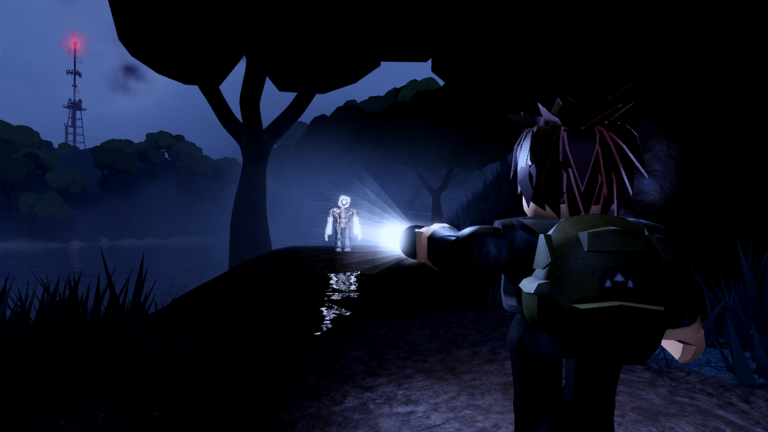
Playing smarter on mobile usually means finding every shortcut possible, and adding a Dead Shore script to your session makes the whole island run a lot smoother.
You wake up stranded on a mysterious island after a massive storm, and now you have to survive the dark while exploring abandoned places and reading notes left by past visitors.
Grabbing what you need and getting around the map is way easier with the right tools ready to go, so here is the working code to try out right now.
Dead Shore Script – Working Script
local Rayfield = loadstring(game:HttpGet("https://sirius.menu/gen2"))()

local Players = game:GetService("Players")
local Workspace = game:GetService("Workspace")
local LocalPlayer = Players.LocalPlayer

--------------------------------------------------------------------- config u dawg
local CONFIG = {
	Font = Enum.Font.Michroma,
	TextSize = 13,
	MaxDistance = 1500, -- labels hidden beyond this many studs
	UpdateRate = 0.2,   -- seconds between distance updates

	Monster = {
		Fill = Color3.fromRGB(255, 30, 30),
		Outline = Color3.fromRGB(255, 120, 120),
		Text = Color3.fromRGB(255, 90, 90),
	},
	Player = {
		Fill = Color3.fromRGB(0, 200, 255),
		Outline = Color3.fromRGB(150, 235, 255),
		Text = Color3.fromRGB(150, 235, 255),
	},
}

local TELEPORTS = {
	{ "Power Sourcer 1", Vector3.new(155, 198, -313) },
	{ "Bunker", Vector3.new(-260, 61, 62) },
	{ "Fuel Refill", Vector3.new(-532, 73, 341) },
	{ "Cabin", Vector3.new(367, 55, 426) },
	{ "Radio Tower", Vector3.new(1204, 271, -115) },
	{ "Power Sourcer 2", Vector3.new(318, 168, -42) },
	{ "Power Sourcer 3", Vector3.new(156, 199, -309) },
}

--------------------------------------------------------------------- ui
local window = Rayfield:CreateWindow({
	name = "Dead Shore",
	subtitle = "Rayfield Gen2",
	sidebarLayout = true,
})

--------------------------------------------------------------------- core of le esp
local container = Instance.new("Folder")
container.Name = "DeadShoreESP"

if not pcall(function()
	container.Parent = (gethui and gethui()) or game:GetService("CoreGui")
end) then
	container.Parent = LocalPlayer:WaitForChild("PlayerGui")
end

local function getRoot(char)
	return char and char:FindFirstChild("HumanoidRootPart")
end

local function getAdorneePart(model)
	if model:IsA("BasePart") then return model end
	if model:IsA("Model") and model.PrimaryPart then return model.PrimaryPart end
	return model:FindFirstChild("HumanoidRootPart")
		or model:FindFirstChild("Head")
		or model:FindFirstChildWhichIsA("BasePart", true)
end

local trackers = {}

local function createTracker(colors)
	local tracker = { enabled = false, items = {}, colors = colors }

	function tracker:Remove(model)
		local item = self.items[model]
		if not item then return end
		self.items[model] = nil
		item.highlight:Destroy()
		item.gui:Destroy()
		item.conn:Disconnect()
	end

	function tracker:Add(model)
		if not self.enabled or self.items[model] then return end

		local highlight = Instance.new("Highlight")
		highlight.FillColor = colors.Fill
		highlight.OutlineColor = colors.Outline
		highlight.FillTransparency = 0.6
		highlight.OutlineTransparency = 0
		highlight.DepthMode = Enum.HighlightDepthMode.AlwaysOnTop
		highlight.Adornee = model
		highlight.Parent = container

		local gui = Instance.new("BillboardGui")
		gui.Size = UDim2.fromOffset(180, 20) -- fixed pixel size, never gets huge
		gui.StudsOffsetWorldSpace = Vector3.new(0, 3, 0)
		gui.AlwaysOnTop = true
		gui.LightInfluence = 0
		gui.MaxDistance = CONFIG.MaxDistance
		gui.ResetOnSpawn = false
		gui.Parent = container

		local label = Instance.new("TextLabel")
		label.Size = UDim2.fromScale(1, 1)
		label.BackgroundTransparency = 1
		label.Text = model.Name
		label.Font = CONFIG.Font
		label.TextSize = CONFIG.TextSize
		label.TextColor3 = colors.Text
		label.TextStrokeColor3 = Color3.new(0, 0, 0)
		label.TextStrokeTransparency = 0.4
		label.Parent = gui

		local item = {
			highlight = highlight,
			gui = gui,
			label = label,
			name = model.Name,
			part = nil,
		}

		item.conn = model.AncestryChanged:Connect(function(_, parent)
			if not parent then self:Remove(model) end
		end)

		self.items[model] = item

		-- the part to measure from / attach the label to may load late
		task.spawn(function()
			for _ = 1, 20 do
				if self.items[model] ~= item then return end
				local part = getAdorneePart(model)
				if part then
					item.part = part
					gui.Adornee = part
					return
				end
				task.wait(0.25)
			end
		end)
	end

	function tracker:Clear()
		for model in pairs(self.items) do
			self:Remove(model)
		end
	end

	table.insert(trackers, tracker)
	return tracker
end

-- loop for esp when esp is on
task.spawn(function()
	while true do
		task.wait(CONFIG.UpdateRate)

		local root = getRoot(LocalPlayer.Character)
		if root then
			local origin = root.Position

			for _, tracker in ipairs(trackers) do
				if tracker.enabled then
					for _, item in pairs(tracker.items) do
						local part = item.part
						if part and part.Parent then
							local dist = math.floor((part.Position - origin).Magnitude)
							item.label.Text = string.format("%s  [%d studs]", item.name, dist)
						end
					end
				end
			end
		end
	end
end)

--------------------------------------------------------------------- monsters ( located in workspace.watchers)
local monsterTracker = createTracker(CONFIG.Monster)
local watchersFolder
local watcherConns = {}

local function disconnectWatchers()
	for _, c in ipairs(watcherConns) do c:Disconnect() end
	table.clear(watcherConns)
end

local function bindWatchers(folder)
	disconnectWatchers()
	watchersFolder = folder
	if not folder then return end

	for _, monster in ipairs(folder:GetChildren()) do
		monsterTracker:Add(monster)
	end

	table.insert(watcherConns, folder.ChildAdded:Connect(function(monster)
		monsterTracker:Add(monster)
	end))
	table.insert(watcherConns, folder.ChildRemoved:Connect(function(monster)
		monsterTracker:Remove(monster)
	end))
end

-- 1 second check just incase the watchers folder is replaced or uhh tite
task.spawn(function()
	while true do
		local folder = Workspace:FindFirstChild("Watchers")
		if folder ~= watchersFolder then
			monsterTracker:Clear()
			bindWatchers(folder)
		end
		task.wait(1)
	end
end)

--------------------------------------------------------------------- playerz
local playerTracker = createTracker(CONFIG.Player)
local playerConns = {}

local function watchPlayer(player)
	if player == LocalPlayer or playerConns[player] then return end

	local conns = {}
	playerConns[player] = conns

	if player.Character then
		playerTracker:Add(player.Character)
	end

	table.insert(conns, player.CharacterAdded:Connect(function(char)
		playerTracker:Add(char)
	end))
	table.insert(conns, player.CharacterRemoving:Connect(function(char)
		playerTracker:Remove(char)
	end))
end

for _, player in ipairs(Players:GetPlayers()) do
	watchPlayer(player)
end

Players.PlayerAdded:Connect(watchPlayer)
Players.PlayerRemoving:Connect(function(player)
	local conns = playerConns[player]
	if conns then
		for _, c in ipairs(conns) do c:Disconnect() end
		playerConns[player] = nil
	end
	if player.Character then
		playerTracker:Remove(player.Character)
	end
end)

--------------------------------------------------------------------- esp bro i guess bro
local espTab = window:CreateTab({ name = "ESP" })

espTab:CreateToggle({
	name = "Monster ESP",
	callback = function(value)
		monsterTracker.enabled = value
		if value then
			if watchersFolder then
				for _, monster in ipairs(watchersFolder:GetChildren()) do
					monsterTracker:Add(monster)
				end
			end
		else
			monsterTracker:Clear()
		end
	end,
})

espTab:CreateToggle({
	name = "Player ESP",
	callback = function(value)
		playerTracker.enabled = value
		if value then
			for _, player in ipairs(Players:GetPlayers()) do
				if player ~= LocalPlayer and player.Character then
					playerTracker:Add(player.Character)
				end
			end
		else
			playerTracker:Clear()
		end
	end,
})

--------------------------------------------------------------------- super good tp tab
local teleportTab = window:CreateTab({ name = "Teleport" })

local function teleportTo(position)
	local char = LocalPlayer.Character
	local root = getRoot(char)

	if not root then
		window:Notify({ title = "Teleport", content = "Your character isn't loaded yet." })
		return
	end

	root.AssemblyLinearVelocity = Vector3.zero
	char:PivotTo(CFrame.new(position))
end

for _, spot in ipairs(TELEPORTS) do
	local name, position = spot[1], spot[2]

	teleportTab:CreateButton({
		name = name,
		callback = function()
			teleportTo(position)
		end,
	})
endCopy the code above into a compatible Roblox script executor if you choose to test it.
Dead Shore Script Status
Roblox and game updates can affect compatibility, so the script’s status should be treated as temporary rather than guaranteed.
Frequently Asked Questions
What is a Dead Shore script?
A Dead Shore script is third-party Lua code intended to run alongside the Roblox game through a compatible script executor.
What features does this Dead Shore script include?
Different scripts contain different code and features. Check the script menu after it loads to see everything it offers.
How do you use the Dead Shore script?
Pick a compatible executor such as Hydrogen, MacSploit, AWP.GG, Delta, Fluxus, Codex, launch Roblox and join the game, copy the complete Lua code from the script card above, paste it into the executor’s editor, and click Run or Execute. Compatibility changes over time, so a name here doesn’t guarantee current support.
Can a Dead Shore script get your Roblox account banned?
Yes. Third-party scripts can violate Roblox rules and may put an account at risk. Only use code from a source you trust, never enter your Roblox password into a script or executor, and test on an alternate account first.
Does the Dead Shore script work on mobile?
Check whether both the executor and the script support your device and the current Roblox version. Mobile executor support does not guarantee that every script will work.

