
Playing smarter on mobile makes grinding way less painful, especially when you use the Animal Hospital script to skip the annoying parts.
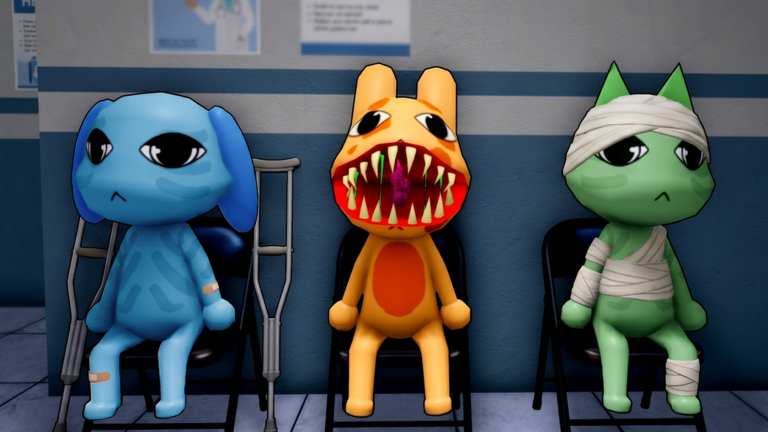
You got hired to work the night shift at Animal Hospital, and now your job is to treat the patients, even though some of them are acting weird.
If you want to grab the gear giver improved feature and make your shift way easier, here is the working code you need.
Animal Hospital Script – Gear Giver Improved & More
local Players = game:GetService("Players")
local UIS = game:GetService("UserInputService")
local LP = Players.LocalPlayer
local TS = game:GetService("TweenService")

local guiParent = LP:WaitForChild("PlayerGui")
pcall(function() if gethui then guiParent = gethui() end end)
for _, g in ipairs(guiParent:GetChildren()) do
	if g.Name == "GearGiverGui" then g:Destroy() end
end

local function findGearRemote()
	for _, d in ipairs(game:GetDescendants()) do
		if d:IsA("RemoteFunction") and d.Name == "RemoteFunction" then
			if d:FindFirstAncestor("gear machine chest") then return d end
		end
	end
	return nil
end

local screen = Instance.new("ScreenGui")
screen.Name = "GearGiverGui"
screen.ResetOnSpawn = false
screen.IgnoreGuiInset = true
screen.ZIndexBehavior = Enum.ZIndexBehavior.Sibling
screen.DisplayOrder = 999
screen.Parent = guiParent

local W = 320
local SINGLE_H, MULTI_H = 274, 312

local connections = {}
local function track(conn)
	table.insert(connections, conn)
	return conn
end

local destroyed = false

local main = Instance.new("Frame")
main.Name = "Main"
main.AnchorPoint = Vector2.new(0.5, 0.5)
main.Position = UDim2.fromScale(0.5, 0.5)
main.Size = UDim2.fromOffset(W, SINGLE_H)
main.BackgroundColor3 = Color3.fromRGB(22, 22, 34)
main.BorderSizePixel = 0
main.Active = true
main.ClipsDescendants = true
main.ZIndex = 1
main.Parent = screen
Instance.new("UICorner", main).CornerRadius = UDim.new(0, 14)
local mainGrad = Instance.new("UIGradient")
mainGrad.Color = ColorSequence.new(Color3.fromRGB(30, 30, 46), Color3.fromRGB(16, 16, 24))
mainGrad.Rotation = 90
mainGrad.Parent = main
local mainStroke = Instance.new("UIStroke")
mainStroke.Thickness = 1
mainStroke.Color = Color3.fromRGB(80, 80, 120)
mainStroke.Transparency = 0.4
mainStroke.Parent = main

local header = Instance.new("Frame")
header.Name = "Header"
header.Size = UDim2.new(1, 0, 0, 36)
header.BackgroundTransparency = 1
header.BorderSizePixel = 0
header.ZIndex = 2
header.Parent = main

local dot = Instance.new("Frame")
dot.Name = "Dot"
dot.Size = UDim2.fromOffset(10, 10)
dot.Position = UDim2.new(0, 12, 0.5, 0)
dot.AnchorPoint = Vector2.new(0, 0.5)
dot.BackgroundColor3 = Color3.fromRGB(124, 92, 255)
dot.BorderSizePixel = 0
dot.ZIndex = 3
dot.Parent = header
Instance.new("UICorner", dot).CornerRadius = UDim.new(1, 0)
local dotGrad = Instance.new("UIGradient")
dotGrad.Color = ColorSequence.new(Color3.fromRGB(124, 92, 255), Color3.fromRGB(56, 189, 248))
dotGrad.Parent = dot

local title = Instance.new("TextLabel")
title.Name = "Title"
title.BackgroundTransparency = 1
title.Position = UDim2.new(0, 30, 0, 0)
title.Size = UDim2.new(1, -100, 1, 0)
title.Font = Enum.Font.GothamBold
title.Text = "GEAR GIVER"
title.TextSize = 15
title.TextColor3 = Color3.fromRGB(235, 235, 245)
title.TextXAlignment = Enum.TextXAlignment.Left
title.ZIndex = 3
title.Parent = header

local minBtn = Instance.new("TextButton")
minBtn.Name = "Minimize"
minBtn.Size = UDim2.fromOffset(22, 22)
minBtn.Position = UDim2.new(1, -40, 0.5, 0)
minBtn.AnchorPoint = Vector2.new(1, 0.5)
minBtn.BackgroundColor3 = Color3.fromRGB(50, 50, 70)
minBtn.BorderSizePixel = 0
minBtn.AutoButtonColor = false
minBtn.Font = Enum.Font.GothamBold
minBtn.Text = "–"
minBtn.TextSize = 14
minBtn.TextColor3 = Color3.fromRGB(200, 200, 215)
minBtn.ZIndex = 3
minBtn.Parent = header
Instance.new("UICorner", minBtn).CornerRadius = UDim.new(0, 7)
minBtn.MouseEnter:Connect(function() TS:Create(minBtn, TweenInfo.new(0.15), {BackgroundColor3 = Color3.fromRGB(255, 180, 60), TextColor3 = Color3.fromRGB(30, 30, 30)}):Play() end)
minBtn.MouseLeave:Connect(function() TS:Create(minBtn, TweenInfo.new(0.15), {BackgroundColor3 = Color3.fromRGB(50, 50, 70), TextColor3 = Color3.fromRGB(200, 200, 215)}):Play() end)

local closeBtn = Instance.new("TextButton")
closeBtn.Name = "Close"
closeBtn.Size = UDim2.fromOffset(22, 22)
closeBtn.Position = UDim2.new(1, -12, 0.5, 0)
closeBtn.AnchorPoint = Vector2.new(1, 0.5)
closeBtn.BackgroundColor3 = Color3.fromRGB(50, 50, 70)
closeBtn.BorderSizePixel = 0
closeBtn.AutoButtonColor = false
closeBtn.Font = Enum.Font.GothamBold
closeBtn.Text = "X"
closeBtn.TextSize = 12
closeBtn.TextColor3 = Color3.fromRGB(200, 200, 215)
closeBtn.ZIndex = 3
closeBtn.Parent = header
Instance.new("UICorner", closeBtn).CornerRadius = UDim.new(0, 7)
closeBtn.MouseEnter:Connect(function() TS:Create(closeBtn, TweenInfo.new(0.15), {BackgroundColor3 = Color3.fromRGB(220, 60, 80), TextColor3 = Color3.fromRGB(255, 255, 255)}):Play() end)
closeBtn.MouseLeave:Connect(function() TS:Create(closeBtn, TweenInfo.new(0.15), {BackgroundColor3 = Color3.fromRGB(50, 50, 70), TextColor3 = Color3.fromRGB(200, 200, 215)}):Play() end)

local modeBar = Instance.new("Frame")
modeBar.Name = "ModeBar"
modeBar.Position = UDim2.new(0, 12, 0, 44)
modeBar.Size = UDim2.new(1, -24, 0, 28)
modeBar.BackgroundColor3 = Color3.fromRGB(26, 26, 38)
modeBar.BorderSizePixel = 0
modeBar.ZIndex = 2
modeBar.Parent = main
Instance.new("UICorner", modeBar).CornerRadius = UDim.new(0, 9)
local mbStroke = Instance.new("UIStroke"); mbStroke.Thickness = 1; mbStroke.Color = Color3.fromRGB(60, 60, 90); mbStroke.Transparency = 0.4; mbStroke.Parent = modeBar

local function makeModeBtn(name, text, xscale)
	local b = Instance.new("TextButton")
	b.Name = name
	b.Position = UDim2.new(xscale, 0, 0, 0)
	b.Size = UDim2.new(0.5, -4, 1, -6)
	b.BackgroundColor3 = Color3.fromRGB(124, 92, 255)
	b.BackgroundTransparency = 1
	b.BorderSizePixel = 0
	b.AutoButtonColor = false
	b.Font = Enum.Font.GothamBold
	b.Text = text
	b.TextSize = 12
	b.TextColor3 = Color3.fromRGB(150, 150, 175)
	b.ZIndex = 3
	b.Parent = modeBar
	Instance.new("UICorner", b).CornerRadius = UDim.new(0, 7)
	return b
end

local btnSingle = makeModeBtn("Single", "SINGLE", 0)
btnSingle.Position = UDim2.new(0, 3, 0, 3)
local btnMulti = makeModeBtn("Multi", "MULTIPLE", 0.5)
btnMulti.Position = UDim2.new(0.5, 1, 0, 3)

local function makeBox()
	local b = Instance.new("TextBox")
	b.Name = "GearBox"
	b.BackgroundColor3 = Color3.fromRGB(30, 30, 44)
	b.BorderSizePixel = 0
	b.Font = Enum.Font.Gotham
	b.PlaceholderColor3 = Color3.fromRGB(120, 120, 145)
	b.Text = ""
	b.TextColor3 = Color3.fromRGB(235, 235, 245)
	b.TextSize = 13
	b.ClearTextOnFocus = false
	b.ZIndex = 2
	b.Parent = main
	Instance.new("UICorner", b).CornerRadius = UDim.new(0, 9)
	local s = Instance.new("UIStroke"); s.Thickness = 1; s.Color = Color3.fromRGB(70, 70, 100); s.Transparency = 0.3; s.Parent = b
	local p = Instance.new("UIPadding"); p.PaddingLeft = UDim.new(0, 8); p.PaddingRight = UDim.new(0, 8); p.Parent = b
	b.Focused:Connect(function() TS:Create(s, TweenInfo.new(0.15), {Color = Color3.fromRGB(124, 92, 255), Transparency = 0}):Play() end)
	b.FocusLost:Connect(function() TS:Create(s, TweenInfo.new(0.15), {Color = Color3.fromRGB(70, 70, 100), Transparency = 0.3}):Play() end)
	return b
end

local tb1 = makeBox()
local tb2 = makeBox()
local tb3 = makeBox()
local tb4 = makeBox()
local boxes = {tb1, tb2, tb3, tb4}

local giveBtn = Instance.new("TextButton")
giveBtn.Name = "GiveButton"
giveBtn.Size = UDim2.new(1, -24, 0, 38)
giveBtn.BackgroundColor3 = Color3.fromRGB(124, 92, 255)
giveBtn.BorderSizePixel = 0
giveBtn.AutoButtonColor = false
giveBtn.Font = Enum.Font.GothamBold
giveBtn.Text = "GIVE GEAR"
giveBtn.TextSize = 15
giveBtn.TextColor3 = Color3.fromRGB(255, 255, 255)
giveBtn.ZIndex = 2
giveBtn.Parent = main
Instance.new("UICorner", giveBtn).CornerRadius = UDim.new(0, 9)
local gGrad = Instance.new("UIGradient")
gGrad.Color = ColorSequence.new(Color3.fromRGB(139, 108, 255), Color3.fromRGB(56, 189, 248))
gGrad.Parent = giveBtn
local gStroke = Instance.new("UIStroke"); gStroke.Thickness = 1; gStroke.Color = Color3.fromRGB(180, 165, 255); gStroke.Transparency = 0.5; gStroke.Parent = giveBtn
giveBtn.MouseEnter:Connect(function() TS:Create(giveBtn, TweenInfo.new(0.15), {Size = UDim2.new(1, -20, 0, 38)}):Play() end)
giveBtn.MouseLeave:Connect(function() TS:Create(giveBtn, TweenInfo.new(0.15), {Size = UDim2.new(1, -24, 0, 38)}):Play() end)

local status = Instance.new("TextLabel")
status.Name = "Status"
status.BackgroundTransparency = 1
status.Size = UDim2.new(1, -24, 0, 24)
status.Font = Enum.Font.Gotham
status.TextSize = 12
status.TextColor3 = Color3.fromRGB(140, 140, 165)
status.TextXAlignment = Enum.TextXAlignment.Left
status.ZIndex = 2
status.Parent = main

local function setStatus(msg, color)
	status.Text = msg
	status.TextColor3 = color or Color3.fromRGB(140, 140, 165)
end

local loopEnabled = false
local loopDelay = 1.0
local loopCount = 0
local loopThread = nil

local loopRow = Instance.new("Frame")
loopRow.Name = "LoopRow"
loopRow.Position = UDim2.fromOffset(12, 196)
loopRow.Size = UDim2.new(1, -24, 0, 30)
loopRow.BackgroundColor3 = Color3.fromRGB(30, 30, 44)
loopRow.BorderSizePixel = 0
loopRow.ZIndex = 2
loopRow.Parent = main
Instance.new("UICorner", loopRow).CornerRadius = UDim.new(0, 8)
local lrStroke = Instance.new("UIStroke"); lrStroke.Thickness = 1; lrStroke.Color = Color3.fromRGB(70, 70, 100); lrStroke.Transparency = 0.3; lrStroke.Parent = loopRow

local loopLabel = Instance.new("TextLabel")
loopLabel.BackgroundTransparency = 1
loopLabel.Position = UDim2.fromOffset(10, 0)
loopLabel.Size = UDim2.new(1, -80, 1, 0)
loopLabel.Font = Enum.Font.GothamBold
loopLabel.Text = "LOOP GIVE"
loopLabel.TextSize = 12
loopLabel.TextColor3 = Color3.fromRGB(220, 220, 235)
loopLabel.TextXAlignment = Enum.TextXAlignment.Left
loopLabel.ZIndex = 3
loopLabel.Parent = loopRow

local loopTrack = Instance.new("Frame")
loopTrack.Size = UDim2.fromOffset(40, 20)
loopTrack.Position = UDim2.new(1, -50, 0.5, -10)
loopTrack.BackgroundColor3 = Color3.fromRGB(60, 60, 80)
loopTrack.BorderSizePixel = 0
loopTrack.ZIndex = 3
loopTrack.Parent = loopRow
Instance.new("UICorner", loopTrack).CornerRadius = UDim.new(1, 0)

local loopKnob = Instance.new("Frame")
loopKnob.Size = UDim2.fromOffset(16, 16)
loopKnob.Position = UDim2.new(0, 2, 0.5, -8)
loopKnob.BackgroundColor3 = Color3.fromRGB(255, 255, 255)
loopKnob.BorderSizePixel = 0
loopKnob.ZIndex = 4
loopKnob.Parent = loopTrack
Instance.new("UICorner", loopKnob).CornerRadius = UDim.new(1, 0)

local loopHit = Instance.new("TextButton")
loopHit.Size = UDim2.new(1, 0, 1, 0)
loopHit.BackgroundTransparency = 1
loopHit.Text = ""
loopHit.ZIndex = 5
loopHit.Parent = loopRow

local delayRow = Instance.new("Frame")
delayRow.Name = "DelayRow"
delayRow.Position = UDim2.fromOffset(12, 232)
delayRow.Size = UDim2.new(1, -24, 0, 30)
delayRow.BackgroundColor3 = Color3.fromRGB(30, 30, 44)
delayRow.BorderSizePixel = 0
delayRow.ZIndex = 2
delayRow.Parent = main
Instance.new("UICorner", delayRow).CornerRadius = UDim.new(0, 8)
local drStroke = Instance.new("UIStroke"); drStroke.Thickness = 1; drStroke.Color = Color3.fromRGB(70, 70, 100); drStroke.Transparency = 0.3; drStroke.Parent = delayRow

local delayLabel = Instance.new("TextLabel")
delayLabel.BackgroundTransparency = 1
delayLabel.Position = UDim2.fromOffset(10, 0)
delayLabel.Size = UDim2.new(1, -90, 1, 0)
delayLabel.Font = Enum.Font.GothamBold
delayLabel.Text = "LOOP DELAY (s)"
delayLabel.TextSize = 12
delayLabel.TextColor3 = Color3.fromRGB(220, 220, 235)
delayLabel.TextXAlignment = Enum.TextXAlignment.Left
delayLabel.ZIndex = 3
delayLabel.Parent = delayRow

local delayValue = Instance.new("TextBox")
delayValue.Name = "DelayValue"
delayValue.Size = UDim2.fromOffset(64, 22)
delayValue.Position = UDim2.new(1, -74, 0.5, -11)
delayValue.BackgroundColor3 = Color3.fromRGB(60, 60, 80)
delayValue.BorderSizePixel = 0
delayValue.Font = Enum.Font.GothamBold
delayValue.Text = "1.0"
delayValue.PlaceholderText = "1.0"
delayValue.PlaceholderColor3 = Color3.fromRGB(140, 140, 160)
delayValue.TextSize = 12
delayValue.TextColor3 = Color3.fromRGB(220, 220, 235)
delayValue.ClearTextOnFocus = false
delayValue.ZIndex = 3
delayValue.Parent = delayRow
Instance.new("UICorner", delayValue).CornerRadius = UDim.new(0, 6)
local dvPad = Instance.new("UIPadding"); dvPad.PaddingLeft = UDim.new(0, 6); dvPad.PaddingRight = UDim.new(0, 6); dvPad.Parent = delayValue
local dvStroke = Instance.new("UIStroke"); dvStroke.Thickness = 1; dvStroke.Color = Color3.fromRGB(70, 70, 100); dvStroke.Transparency = 0.3; dvStroke.Parent = delayValue

delayValue.Focused:Connect(function()
	TS:Create(dvStroke, TweenInfo.new(0.15), {Color = Color3.fromRGB(124, 92, 255), Transparency = 0}):Play()
end)

delayValue.FocusLost:Connect(function()
	TS:Create(dvStroke, TweenInfo.new(0.15), {Color = Color3.fromRGB(70, 70, 100), Transparency = 0.3}):Play()
	local num = tonumber(delayValue.Text)
	if not num then
		delayValue.Text = tostring(loopDelay)
		setStatus("Delay must be a number.", Color3.fromRGB(240, 120, 120))
		return
	end
	if num < 0.05 then num = 0.05 end
	if num > 60 then num = 60 end
	loopDelay = num
	delayValue.Text = tostring(loopDelay)
	setStatus("Loop delay set to " .. loopDelay .. "s.")
end)

delayValue:GetPropertyChangedSignal("Text"):Connect(function()
	local clean = delayValue.Text:gsub("[^%d%.]", "")
	local firstDot = clean:find("%.")
	if firstDot then
		clean = clean:sub(1, firstDot) .. clean:sub(firstDot + 1):gsub("%.", "")
	end
	if clean ~= delayValue.Text then
		delayValue.Text = clean
	end
end)

-- ============================================================
-- BUBBLE with persistent position
-- ============================================================
local bubble = Instance.new("TextButton")
bubble.Name = "Bubble"
bubble.Size = UDim2.fromOffset(52, 52)
bubble.Position = UDim2.new(0, 24, 0, 80)
bubble.BackgroundColor3 = Color3.fromRGB(22, 22, 34)
bubble.BorderSizePixel = 0
bubble.AutoButtonColor = false
bubble.Font = Enum.Font.GothamBold
bubble.Text = "GG"
bubble.TextSize = 16
bubble.TextColor3 = Color3.fromRGB(235, 235, 245)
bubble.Visible = false
bubble.Active = true
bubble.ZIndex = 50
bubble.Parent = screen
Instance.new("UICorner", bubble).CornerRadius = UDim.new(1, 0)
local bubbleGrad = Instance.new("UIGradient")
bubbleGrad.Color = ColorSequence.new(Color3.fromRGB(139, 108, 255), Color3.fromRGB(56, 189, 248))
bubbleGrad.Parent = bubble
local bubbleStroke = Instance.new("UIStroke")
bubbleStroke.Thickness = 1.5
bubbleStroke.Color = Color3.fromRGB(180, 165, 255)
bubbleStroke.Transparency = 0.2
bubbleStroke.Parent = bubble

-- persistent bubble position: saved across minimize/reopen cycles
local bubbleSavedPos = nil

local bubbleDragging = false
local bubbleDragStart = nil
local bubbleStartPos = nil
local bubbleMoved = false

bubble.InputBegan:Connect(function(input)
	if input.UserInputType == Enum.UserInputType.MouseButton1 or input.UserInputType == Enum.UserInputType.Touch then
		bubbleDragging = true
		bubbleMoved = false
		bubbleDragStart = input.Position
		bubbleStartPos = bubble.Position
		input.Changed:Connect(function()
			if input.UserInputState == Enum.UserInputState.End then
				bubbleDragging = false
				-- SAVE: remember where the user dropped the bubble
				bubbleSavedPos = bubble.Position
			end
		end)
	end
end)

UIS.InputChanged:Connect(function(input)
	if bubbleDragging and (input.UserInputType == Enum.UserInputType.MouseMovement or input.UserInputType == Enum.UserInputType.Touch) then
		local delta = input.Position - bubbleDragStart
		if delta.Magnitude > 6 then bubbleMoved = true end
		bubble.Position = UDim2.new(bubbleStartPos.X.Scale, bubbleStartPos.X.Offset + delta.X, bubbleStartPos.Y.Scale, bubbleStartPos.Y.Offset + delta.Y)
	end
end)

bubble.MouseButton1Click:Connect(function()
	if bubbleMoved then return end
	bubble.Visible = false
	main.Visible = true
	TS:Create(main, TweenInfo.new(0.2, Enum.EasingStyle.Quad, Enum.EasingDirection.Out), {
		Size = UDim2.fromOffset(W, mode == "multi" and MULTI_H or SINGLE_H)
	}):Play()
end)

local function fullTeardown()
	destroyed = true
	loopEnabled = false
	if loopThread then pcall(task.cancel, loopThread); loopThread = nil end
	for _, c in ipairs(connections) do
		pcall(function() c:Disconnect() end)
	end
	connections = {}
	pcall(function() screen:Destroy() end)
	pcall(function()
		if syn and syn.gc then syn.gc() end
	end)
end

-- minimize: bubble returns to its saved spot if the user has dragged it before
local function minimizeToBubble()
	if bubbleSavedPos then
		-- restore where user last dragged it
		bubble.Position = bubbleSavedPos
	else
		-- first time: place it near the hub
		bubble.Position = UDim2.new(
			main.Position.X.Scale, main.Position.X.Offset - 26,
			main.Position.Y.Scale, main.Position.Y.Offset - 26
		)
	end
	main.Visible = false
	bubble.Visible = true
	setStatus("minimized")
end

minBtn.MouseButton1Click:Connect(minimizeToBubble)
closeBtn.MouseButton1Click:Connect(fullTeardown)

local function giveGear()
	if destroyed then return end
	local ids = {}
	for _, b in ipairs(boxes) do
		if b.Visible then
			for id in b.Text:gmatch("%d+") do ids[#ids+1] = id end
		end
	end
	if #ids == 0 then
		if not loopEnabled then
			setStatus("Enter at least one valid Gear ID.", Color3.fromRGB(240, 120, 120))
		end
		return
	end
	local remote = findGearRemote()
	if not remote then
		if not loopEnabled then
			setStatus("Gear remote not found.", Color3.fromRGB(240, 120, 120))
		end
		return
	end
	if not loopEnabled then
		setStatus("Requesting " .. #ids .. " gear(s)...", Color3.fromRGB(220, 200, 120))
	end
	local okCount = 0
	for _, id in ipairs(ids) do
		if destroyed then return end
		local ok = pcall(function() remote:InvokeServer("give gear", id) end)
		if ok then okCount += 1 end
		task.wait(0.1)
	end
	if not loopEnabled then
		if okCount == #ids then
			setStatus("Requested " .. okCount .. " gear(s)!", Color3.fromRGB(120, 230, 150))
		else
			setStatus("Requested " .. okCount .. "/" .. #ids .. " gear(s).", Color3.fromRGB(230, 200, 120))
		end
	end
end

local function renderLoopToggle()
	if destroyed then return end
	TS:Create(loopKnob, TweenInfo.new(0.15), {
		Position = loopEnabled and UDim2.new(1, -18, 0.5, -8) or UDim2.new(0, 2, 0.5, -8)
	}):Play()
	TS:Create(loopTrack, TweenInfo.new(0.15), {
		BackgroundColor3 = loopEnabled and Color3.fromRGB(120, 230, 150) or Color3.fromRGB(60, 60, 80)
	}):Play()
end

local function stopLoop()
	loopEnabled = false
	if loopThread then
		pcall(task.cancel, loopThread)
		loopThread = nil
	end
	renderLoopToggle()
end

local function startLoop()
	loopCount = 0
	if loopThread then task.cancel(loopThread) end
	loopThread = task.spawn(function()
		while loopEnabled and not destroyed do
			giveGear()
			loopCount += 1
			if loopEnabled and not destroyed then
				setStatus("Loop #" .. loopCount .. " · next in " .. loopDelay .. "s",
					Color3.fromRGB(120, 200, 230))
			end
			task.wait(loopDelay)
		end
	end)
end

loopHit.MouseButton1Click:Connect(function()
	if destroyed then return end
	loopEnabled = not loopEnabled
	renderLoopToggle()
	if loopEnabled then
		startLoop()
	else
		stopLoop()
		setStatus("Loop stopped · " .. loopCount .. " cycle(s).", Color3.fromRGB(150, 150, 175))
	end
end)

local mode = "single"
local halfW = (W - 24 - 8) / 2

local function setMode(newMode)
	if destroyed then return end
	mode = newMode
	local isMulti = newMode == "multi"

	if isMulti then
		tb1.PlaceholderText = "Gear ID 1"
		tb2.PlaceholderText = "Gear ID 2"
		tb3.PlaceholderText = "Gear ID 3"
		tb4.PlaceholderText = "Gear ID 4"
		tb1.Position = UDim2.fromOffset(12, 80);  tb1.Size = UDim2.fromOffset(halfW, 32)
		tb2.Position = UDim2.fromOffset(12 + halfW + 8, 80); tb2.Size = UDim2.fromOffset(halfW, 32)
		tb3.Position = UDim2.fromOffset(12, 116); tb3.Size = UDim2.fromOffset(halfW, 32)
		tb4.Position = UDim2.fromOffset(12 + halfW + 8, 116); tb4.Size = UDim2.fromOffset(halfW, 32)
		tb2.Visible = true; tb3.Visible = true; tb4.Visible = true
		TS:Create(btnMulti, TweenInfo.new(0.18), {BackgroundTransparency = 0, TextColor3 = Color3.fromRGB(255, 255, 255)}):Play()
		TS:Create(btnSingle, TweenInfo.new(0.18), {BackgroundTransparency = 1, TextColor3 = Color3.fromRGB(150, 150, 175)}):Play()
		TS:Create(giveBtn, TweenInfo.new(0.2), {Position = UDim2.fromOffset(12, 158)}):Play()
		TS:Create(status, TweenInfo.new(0.2), {Position = UDim2.fromOffset(12, 204)}):Play()
		TS:Create(loopRow, TweenInfo.new(0.2), {Position = UDim2.fromOffset(12, 234)}):Play()
		TS:Create(delayRow, TweenInfo.new(0.2), {Position = UDim2.fromOffset(12, 270)}):Play()
		TS:Create(main, TweenInfo.new(0.2), {Size = UDim2.fromOffset(W, MULTI_H)}):Play()
		setStatus("Multiple gear mode (4 slots).")
	else
		tb1.PlaceholderText = "Enter Gear ID..."
		tb1.Position = UDim2.fromOffset(12, 80); tb1.Size = UDim2.new(1, -24, 0, 34)
		tb2.Visible = false; tb3.Visible = false; tb4.Visible = false
		TS:Create(btnSingle, TweenInfo.new(0.18), {BackgroundTransparency = 0, TextColor3 = Color3.fromRGB(255, 255, 255)}):Play()
		TS:Create(btnMulti, TweenInfo.new(0.18), {BackgroundTransparency = 1, TextColor3 = Color3.fromRGB(150, 150, 175)}):Play()
		TS:Create(giveBtn, TweenInfo.new(0.2), {Position = UDim2.fromOffset(12, 122)}):Play()
		TS:Create(status, TweenInfo.new(0.2), {Position = UDim2.fromOffset(12, 166)}):Play()
		TS:Create(loopRow, TweenInfo.new(0.2), {Position = UDim2.fromOffset(12, 196)}):Play()
		TS:Create(delayRow, TweenInfo.new(0.2), {Position = UDim2.fromOffset(12, 232)}):Play()
		TS:Create(main, TweenInfo.new(0.2), {Size = UDim2.fromOffset(W, SINGLE_H)}):Play()
		setStatus("Single gear mode.")
	end
end

btnSingle.MouseButton1Click:Connect(function() if mode ~= "single" then setMode("single") end end)
btnMulti.MouseButton1Click:Connect(function() if mode ~= "multi" then setMode("multi") end end)

giveBtn.MouseButton1Click:Connect(giveGear)
for _, b in ipairs(boxes) do
	b.FocusLost:Connect(function(enter) if enter then giveGear() end end)
end

setMode("single")

local dragging, dragStart, startPos
header.InputBegan:Connect(function(input)
	if input.UserInputType == Enum.UserInputType.MouseButton1 or input.UserInputType == Enum.UserInputType.Touch then
		dragging = true
		dragStart = input.Position
		startPos = main.Position
		input.Changed:Connect(function()
			if input.UserInputState == Enum.UserInputState.End then dragging = false end
		end)
	end
end)
UIS.InputChanged:Connect(function(input)
	if dragging and (input.UserInputType == Enum.UserInputType.MouseMovement or input.UserInputType == Enum.UserInputType.Touch) then
		local delta = input.Position - dragStart
		main.Position = UDim2.new(startPos.X.Scale, startPos.X.Offset + delta.X, startPos.Y.Scale, startPos.Y.Offset + delta.Y)
	end
end)Copy the code above into a compatible Roblox script executor if you choose to test it.
Animal Hospital Script Status
Roblox and game updates can affect compatibility, so the script’s status should be treated as temporary rather than guaranteed.
Frequently Asked Questions
What is a Animal Hospital script?
A Animal Hospital script is third-party Lua code intended to run alongside the Roblox game through a compatible script executor.
What features does this Animal Hospital script include?
Different scripts contain different code. This version includes: Gear Giver Improved.
How do you use the Animal Hospital script?
Pick a compatible executor such as Hydrogen, MacSploit, AWP.GG, Delta, Fluxus, Codex, launch Roblox and join the game, copy the complete Lua code from the script card above, paste it into the executor’s editor, and click Run or Execute. Compatibility changes over time, so a name here doesn’t guarantee current support.
Can a Animal Hospital script get your Roblox account banned?
Yes. Third-party scripts can violate Roblox rules and may put an account at risk. Only use code from a source you trust, never enter your Roblox password into a script or executor, and test on an alternate account first.
Does the Animal Hospital script work on mobile?
Check whether both the executor and the script support your device and the current Roblox version. Mobile executor support does not guarantee that every script will work.

