
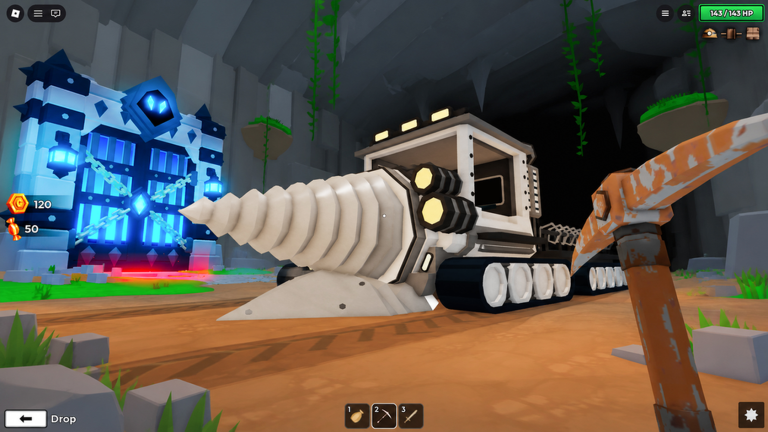
Grinding down through the crust can take forever if you are trying to keep up after a new update drops, so using a Drill to Earth’s Core script makes the whole descent a lot faster.
You spend your time fighting monsters, looting dungeons, and upgrading your vehicle as you dig deeper, and there might even be some weird secrets hidden way down below.
Grab the keyless pastebin code below to get straight to the action.
Drill to Earth’s Core Script – Working Script
-- [[ Rscripts Risk Notice ]]
-- This script is not verified by rscripts.net. Deal with caution.
--
-- Stay safe:
--   • Never log in on unofficial Roblox sites or lookalike domains.
--   • Real Roblox links use roblox.com (check the .com ending).
--   • Treat fake Roblox login / "claim reward" pages as phishing.
-- [[ End Rscripts Risk Notice ]]


local Players         = game:GetService("Players")
local player          = Players.LocalPlayer
local playerGui       = player:WaitForChild("PlayerGui")

local DISCORD_URL   = "https://discord.gg/zQbQJH5rMb"
local GATE_SECONDS  = 15
local LOADER_URL    = "https://raw.githubusercontent.com/2c2s/DrillBeta/main/drillBeta.txt"

local uc = {
	Panel     = Color3.fromRGB(10, 8, 8),
	Surface   = Color3.fromRGB(24, 10, 10),
	Border    = Color3.fromRGB(96, 28, 28),
	Text      = Color3.fromRGB(245, 235, 235),
	Muted     = Color3.fromRGB(170, 120, 120),
	On        = Color3.fromRGB(220, 55, 55),
	Discord   = Color3.fromRGB(200, 35, 35),
}

local function make(className, props, parent)
	local inst = Instance.new(className)
	for k, v in pairs(props) do inst[k] = v end
	inst.Parent = parent
	return inst
end

local function corner(parent, radius)
	make("UICorner", { CornerRadius = UDim.new(0, radius) }, parent)
end

local function copyDiscord()
	pcall(function()
		if setclipboard then
			setclipboard(DISCORD_URL)
		elseif toclipboard then
			toclipboard(DISCORD_URL)
		end
	end)
end

-- =========================================================
-- SPLASH — Discord gate, 15s countdown, then onDone()
-- =========================================================
local function showSplash(onDone)
	local splash = make("ScreenGui", {
		Name = "HackingBrosSplash",
		ResetOnSpawn = false,
		IgnoreGuiInset = true,
		DisplayOrder = 200,
	}, playerGui)

	make("Frame", {
		Size = UDim2.fromScale(1, 1),
		BackgroundColor3 = Color3.new(0, 0, 0),
		BackgroundTransparency = 0.35,
		BorderSizePixel = 0,
	}, splash)

	local card = make("Frame", {
		Size = UDim2.fromOffset(460, 300),
		Position = UDim2.fromScale(0.5, 0.5),
		AnchorPoint = Vector2.new(0.5, 0.5),
		BackgroundColor3 = uc.Panel,
		BorderSizePixel = 0,
	}, splash)
	corner(card, 14)
	make("UIStroke", { Color = uc.Border, Thickness = 1 }, card)

	make("TextLabel", {
		Size = UDim2.new(1, -40, 0, 26),
		Position = UDim2.fromOffset(20, 22),
		BackgroundTransparency = 1,
		Text = "HACKING BROS",
		Font = Enum.Font.GothamBold,
		TextSize = 20,
		TextColor3 = uc.On,
		TextXAlignment = Enum.TextXAlignment.Left,
	}, card)

	make("TextLabel", {
		Size = UDim2.new(1, -40, 0, 16),
		Position = UDim2.fromOffset(20, 50),
		BackgroundTransparency = 1,
		Text = "SCRIPT LOADER · JOIN DISCORD",
		Font = Enum.Font.Gotham,
		TextSize = 11,
		TextColor3 = uc.On,
		TextXAlignment = Enum.TextXAlignment.Left,
	}, card)

	make("TextLabel", {
		Size = UDim2.new(1, -40, 0, 60),
		Position = UDim2.fromOffset(20, 76),
		BackgroundTransparency = 1,
		Text = "Copy the invite link and hop in for the full release. The script below auto-loads once the timer runs out.",
		Font = Enum.Font.Gotham,
		TextSize = 13,
		TextColor3 = uc.Muted,
		TextWrapped = true,
		TextXAlignment = Enum.TextXAlignment.Left,
		TextYAlignment = Enum.TextYAlignment.Top,
	}, card)

	local linkBox = make("TextLabel", {
		Size = UDim2.new(1, -40, 0, 38),
		Position = UDim2.fromOffset(20, 148),
		BackgroundColor3 = uc.Surface,
		BorderSizePixel = 0,
		Text = "discord.gg/zQbQJH5rMb",
		Font = Enum.Font.Code,
		TextSize = 14,
		TextColor3 = uc.Text,
	}, card)
	corner(linkBox, 8)
	make("UIStroke", { Color = uc.Border, Thickness = 1 }, linkBox)

	local copyBtn = make("TextButton", {
		Size = UDim2.new(1, -40, 0, 40),
		Position = UDim2.fromOffset(20, 198),
		BackgroundColor3 = uc.Discord,
		BorderSizePixel = 0,
		Text = "Copy Discord Invite",
		Font = Enum.Font.GothamBold,
		TextSize = 14,
		TextColor3 = uc.Text,
		AutoButtonColor = false,
	}, card)
	corner(copyBtn, 8)

	copyBtn.Activated:Connect(function()
		copyDiscord()
		copyBtn.Text = "Copied — see you inside ✓"
		copyBtn.BackgroundColor3 = uc.On
		copyBtn.TextColor3 = Color3.new(0, 0, 0)
	end)

	local countdown = make("TextLabel", {
		Size = UDim2.new(1, -40, 0, 20),
		Position = UDim2.new(0, 20, 1, -38),
		BackgroundTransparency = 1,
		Text = ("Script loads in %ds…"):format(GATE_SECONDS),
		Font = Enum.Font.Gotham,
		TextSize = 12,
		TextColor3 = uc.Muted,
		TextXAlignment = Enum.TextXAlignment.Left,
	}, card)

	local start = os.clock()
	task.spawn(function()
		while true do
			local remaining = math.max(0, math.ceil(GATE_SECONDS - (os.clock() - start)))
			countdown.Text = ("Script loads in %ds…"):format(remaining)
			if remaining <= 0 then break end
			task.wait(0.1)
		end
		splash:Destroy()
		onDone()
	end)
end

-- =========================================================
-- PERSISTENT DISCORD BUTTON (top-right, survives loader)
-- =========================================================
local function buildDiscordButton()
	local gui = make("ScreenGui", {
		Name = "HackingBrosPersistent",
		ResetOnSpawn = false,
		ZIndexBehavior = Enum.ZIndexBehavior.Sibling,
		DisplayOrder = 150,
	}, playerGui)

	local bar = make("Frame", {
		Name = "DiscordBar",
		Size = UDim2.fromOffset(280, 40),
		Position = UDim2.new(1, -20, 0, 20),
		AnchorPoint = Vector2.new(1, 0),
		BackgroundColor3 = uc.Panel,
		BorderSizePixel = 0,
	}, gui)
	corner(bar, 8)
	make("UIStroke", { Color = uc.Discord, Thickness = 1 }, bar)

	local btn = make("TextButton", {
		Size = UDim2.fromScale(1, 1),
		BackgroundTransparency = 1,
		Text = "",
		AutoButtonColor = false,
	}, bar)

	local label = make("TextLabel", {
		Size = UDim2.new(1, -28, 1, 0),
		Position = UDim2.fromOffset(12, 0),
		BackgroundTransparency = 1,
		Text = "Join DC for more awsum scripts for free",
		Font = Enum.Font.GothamBold,
		TextSize = 12,
		TextColor3 = uc.Text,
		TextXAlignment = Enum.TextXAlignment.Left,
	}, btn)

	make("TextLabel", {
		Size = UDim2.fromOffset(18, 18),
		Position = UDim2.new(1, -24, 0.5, -9),
		BackgroundTransparency = 1,
		Text = "›",
		Font = Enum.Font.GothamBold,
		TextSize = 16,
		TextColor3 = uc.On,
	}, btn)

	btn.Activated:Connect(function()
		copyDiscord()
		label.Text = "Link copied ✓"
		task.delay(1.4, function()
			if label.Parent then
				label.Text = "Join DC for more awsum scripts for free"
			end
		end)
	end)
end

-- =========================================================
-- FIRE LOADER
-- =========================================================
local function runLoader()
	local ok, err = pcall(function()
		loadstring(game:HttpGet(LOADER_URL))()
	end)
	if not ok then
		warn("[HackingBros] loader failed: " .. tostring(err))
	end
end

-- =========================================================
-- RUN
-- =========================================================
showSplash(function()
	buildDiscordButton()
	runLoader()
end)Copy the code above into a compatible Roblox script executor if you choose to test it.
Drill to Earth’s Core Script Status
Roblox and game updates can affect compatibility, so the script’s status should be treated as temporary rather than guaranteed.
Frequently Asked Questions
What is a Drill to Earth’s Core script?
A Drill to Earth’s Core script is third-party Lua code intended to run alongside the Roblox game through a compatible script executor.
What features does this Drill to Earth’s Core script include?
Different scripts contain different code and features. Check the script menu after it loads to see everything it offers.
How do you use the Drill to Earth’s Core script?
Pick a compatible executor such as Hydrogen, MacSploit, AWP.GG, Delta, Fluxus, Codex, launch Roblox and join the game, copy the complete Lua code from the script card above, paste it into the executor’s editor, and click Run or Execute. Compatibility changes over time, so a name here doesn’t guarantee current support.
Can a Drill to Earth’s Core script get your Roblox account banned?
Yes. Third-party scripts can violate Roblox rules and may put an account at risk. Only use code from a source you trust, never enter your Roblox password into a script or executor, and test on an alternate account first.
Does the Drill to Earth’s Core script work on mobile?
Check whether both the executor and the script support your device and the current Roblox version. Mobile executor support does not guarantee that every script will work.

